
Flow.Launcher
 Flow.Launcher copied to clipboard
 Flow-Launcher
Index for Onedrive-Business
Question I am considering whether the explorer plugin may be able to search content in onedrive business, since the windows search seems provide this feature after many updates.
I think windows have done some limit to the windows index settings, while it is not available to index the onedrive-business folder as other folder.

OneDrive is indexed by Explorer, even though it may not appear in the Window's indexing options.
Tested: OneDrive version 20.134.0705.0008 Win1909

OneDrive is indexed by Explorer, even though it may not appear in the Window's indexing options.
Tested: OneDrive version 20.134.0705.0008 Win1909
I know that Onedrive is indexed by Explorer, but Onedrive for business seems indexed in a different way. I have recently found that this search is working, while in the previous windows version I cannot search documents in Onedrive for Business.
The path shows differently, which seems like remotely?
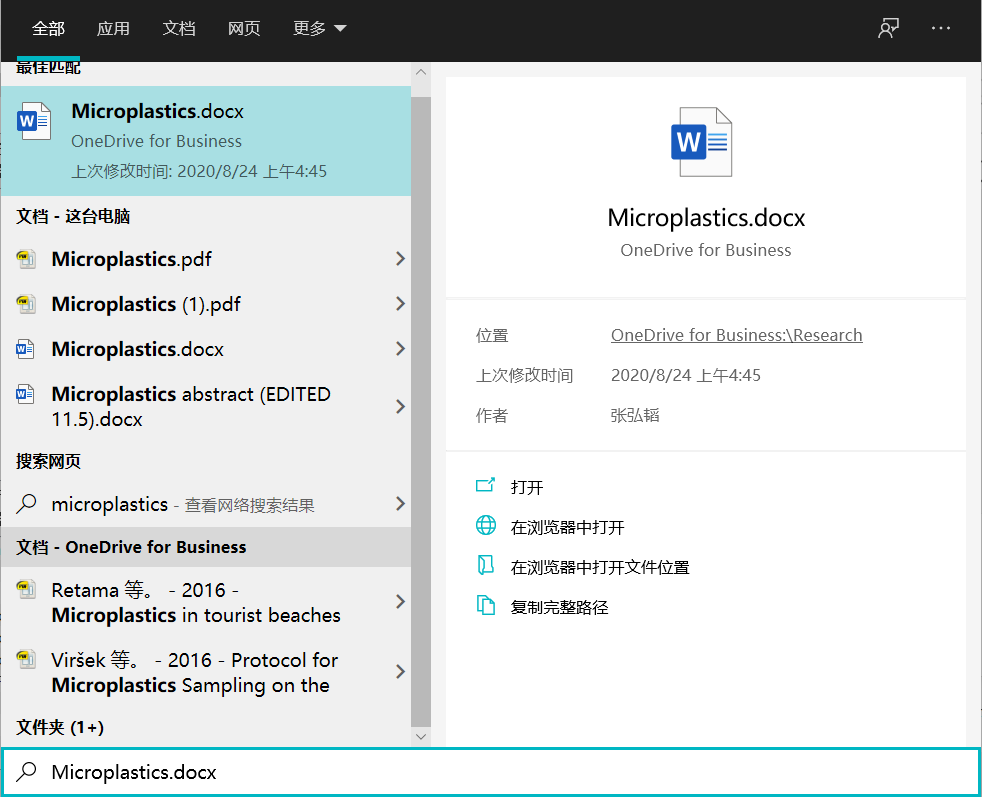 Windows version: 2004
OneDrive is indexed by Explorer, even though it may not appear in the Window's indexing options.
Tested: OneDrive version 20.134.0705.0008 Win1909
I know that Onedrive is indexed by Explorer, but Onedrive for business seems indexed in a different way. I have recently found that this search is working, while in the previous windows version I cannot search documents in Onedrive for Business.
The path shows differently, which seems like remotely?
Yeah sorry I wasn't exact, I tested with OneDrive for Business and was able to get the files and folders.
Have you changed your OFB location?
Strange because if you are able to find them with windows search then Explorer should be picking them up as well.
Have you changed your OFB location?
If OFB means onedrive for Business, I do change it to D:, while I have also changed my personal onedrive to D: as well.
I have tried explorer, which seems unable to search files in OFB with index, but can only search it directly. However, windows search seems work in a different way.
I added OneDrive for Business to the index by going to OneDrive settings > Settings > Files on demand (untick). Then OneDrive for Business is added to the user folder 'C:\Users\username' in indexing options. Windows Search finds the OneDrive files but Flow does not.
However, 'My Documents' folder is not indexed as it is on a server location.
I did not have those issues on Wox using Everything but I am not sure the Everything plugin works for Flow as I do not have admin rights so I cannot proceed with normal Everything installation.

I added OneDrive for Business to the index by going to OneDrive settings > Settings > Files on demand (untick). Then OneDrive for Business is added to the user folder 'C:\Users\username' in indexing options. Windows Search finds the OneDrive files but Flow does not.
Thanks for letting me know. I don't have OFB anymore so will take some time to investigate this again.
However, 'My Documents' folder is not indexed as it is on a server location.
Explorer won't be able to index a server location, as this is a limitation of Windows Index Search.
Have you changed your OFB location?
If OFB means onedrive for Business, I do change it to D:, while I have also changed my personal onedrive to D: as well.
I have tried explorer, which seems unable to search files in OFB with index, but can only search it directly. However, windows search seems work in a different way.
i have a suspicion that this is caused by Explorer not searching drives other than C:\
It should because it is server location, but I don't know how windows explorer handles the search when files is on demand. Explorer do search drives other than C:\ (but not all of them, only Document, Download, etc.).
Though I change index options in Explorer, It's still can't search anything except C disk. That's weird. Can you told me how can I search on all disk in my computer with Flow

Though I change index options in Explorer, It's still can't search anything except C disk. That's weird. Can you told me how can I search on all disk in my computer with Flow
Are u running win 10? If so also check if some paths are being excluded by going to windows settings, search for windows search, and windows may automatically added in paths to be excluded from indexing.
This issue is stale because it has been open 45 days with no activity. Remove stale label or comment or this will be closed in 5 days.
![github-actions[bot] avatar](https://avatars.githubusercontent.com/in/15368?v=4 "Published by a pub.dev verified publisher")