
Mypal68
 Mypal68 copied to clipboard
 Feodor2
BSOD When if i closed 8 tabs on mypal quantum browser
It Happen to BSOD to me, when if i any sites other tabs at same time like 8, when if i closed, it ask me to should close tabs, when i click close tabs to closed browser, and it appear bsod like for no reason, idk why, is way to fix?
Note: i use windows xp home edition for test on real hardware

sorry when if is bad quality form my phone
commented image - not needed and slow overall page load.
same with professional when after closed mypal quantum browser in any tabs
commented image - not needed and slow overall page load.
Screenshots are not usefull. Can try BlueScreenView for useful data Look first page


Please give you hadware spec CPU-MBOARD-RAM-VIDEOCARD Did you try with disabled remote.autostart?
Please give you hadware spec CPU-MBOARD-RAM-VIDEOCARD Did you try with disabled remote.autostart?
Mine Is: CPU: Intel Core i3 M370 2.40GHz Motherborad: VAIO (That it came in my laptop) RAM: 8.00GB (3.29GB Limit it cuz is 32 bit of xp and i have dual boot with other os that is 64 bit) VideoCard: Intel HD Graphics (2010) (Sometime Intel Graphics Media Accelerator HD "2009" but i might upgrade to 2010 version instead of 2012, cuz everytime when i boot xp 32 bit, it start so slow when i'm on desktop, but it stop like any seconds later in 2012 version in intel hd graphics, idk why it happen when is 2012 version) And yes, i didn't knew it about it, i disabled remote.autostart, when i closed browser again with any tabs, it didn't give me bsod anymore, idk why tho
Mine are: CPU Type QuadCore Intel Xeon E5450, 2833 MHz (8.5 x 333) Motherboard Name Gigabyte GA-G31M-ES2L v2 RAM 4085 MB Video Adapter nVIDIA Quadro 600 (p1033)
browser.tabs.remote.autostart;false did the trick
Hmm the hardware is very differnt so not a point, to find other thing you both have.
Looked your bluescreen view data and found it not helpful too, do like this please

@pachuco You did two drivers only, while i want the list of all drivers, please do HTML Report - All Items.
Possible workaround: Disable multi-process.
Steps -
- Go to
about:config, search forbrowser.tabs.remote.autostart, turn it off. - Restart Mypal68 and re-test everything.
Reason (quoted from my own comment on #4) -
According to https://wiki.mozilla.org/Electrolysis#Windows_XP, multi-process has huge stability issues with Windows XP, so the use case is not supported; Also prior Mypal releases (as of 29.3.0) don't even have multi-process, so such unintended incidents didn't happen on them.
And it may work as a workaround for #4 and #6 as well.
i disabled remote.autostart, when i closed browser again with any tabs, it didn't give me bsod anymore, idk why tho
Above may also explain why @MWF2 does not meet BSoDs anymore after disabling multi-process.

@Feodor2 I use Lower Pane Mode -> Only Drivers Found In Stack (F7). Redo with All Drivers (F6)?
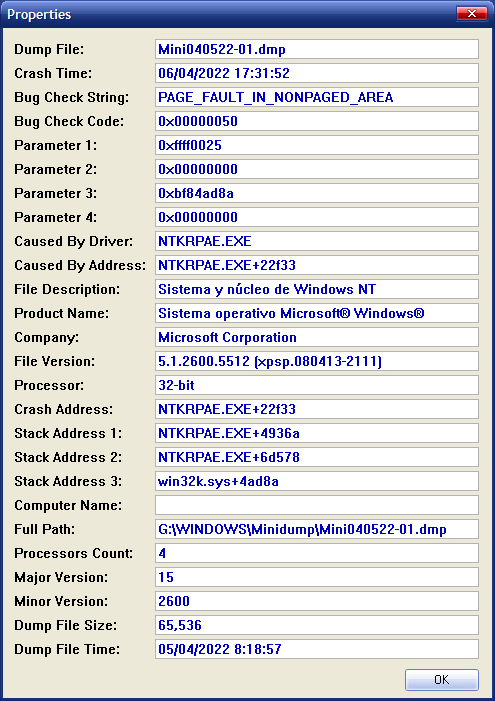

I'm noticing that he uses a PAE patcher (hence the different file name for the kernel executable), that might also cause extra problems.
https://www.google.com/search?q=%22NTKRPAE.EXE%22&filter=0
Mine is: Intel Core i3 540 @ 3.07GHz CPUID 6.5.5, Intel H55 rev. 06, DDR3 KHX1600C9D3/4GX, Motherboard GA-PD55-UDL3 v2.3, NVIDIA GeForce GT 430, DDR3, 1024, 128 bits Windows XP Media Center Edition Professional Service Pack 3 (Build 2600). I made the changes in about:config for browser.tabs.remote.autostart, and I turn it off. I'll do several tests.

win98se
I changed in the about:config and MyPal is no longer opening.
I'm noticing that he uses a PAE patcher
@win98se this is necessary if you want to go beyond the limit of 3GB of RAM
that might also cause extra problems.
@win98se if people only get BSOD with Mypal 68 it's because this browser is still buggy
I already checkd on dozen different machines - many cor2duo, pehnom2, p4, celeron and old xeon core2 generation - no bsod at all.
We are to find out what is either hardware or os or or driver or particular software.
Now we have two 'i' and one xeon winxp, though i have no any 'i' generation machines around then my xeon has 16gb ram nvidia gtx970 and runs win8.
I
I already checkd on dozen different machines - many cor2duo, pehnom2, p4, celeron and old xeon core2 generation - no bsod at all.
@Feodor2 my main machine was built in 2007 and I personally use a Phenom 9850 but that hardware you have tested it on is obsolete and even worse.. 2 cores only ?
I have other machines with i5 or i7 but I don't think hardware is an issue because all other chinese browsers are working fine. MiniBrowser... MiniChrome... XuanWu... @win98se @roytam1
sometimes I get a BSOD when I close chrome based browsers but this problem already existed with the original chrome.
plain XP SP3 is still buggy, better picking up all POSReady2009 updates and try again.

@roytam1 I don't use the unofficial SP4, all my updates were downloaded from M$ website.
did you install all POSR2009 updates and then make an image of your hard drive or did you perform other alternatives for storing your XP copy ?
I wonder if M$ ever released newer updates post April 2019... ?
I have been busy enough with other things and had no time for this labor but I am not sure if there still is an affective way to download updates from M$ servers.....