
everything-presence-one
 everything-presence-one copied to clipboard
 EverythingSmartHome
Breaking change - Room substitution removed?
The latest update (1.1.3 -> 1.1.4) changed the names of every single sensor because it completely removed the "Room" substitution. This means I have to update every single automation or panel in Home Assistant that refers to the old names.
This kind of breaking change should not have been made as a minor version change, especially without some kind of announcement. I got the update automatically while just trying to change a temperature offset, and wondered why my lights stopped turning on.
Additionally, all of my sensors are now things like "sensor.everything_presence_one_temperature", when it used to be "sensor.office_temperature".
Can the "Room" substitution be put back in? It was extremely useful, and I'm confused why it was removed.

Looks like the new substitution is using "Friendly Name". I still feel this should at least be a major version change (1.1.3 -> 1.2.0 instead of 1.1.4), since it breaks existing configurations.
This is definitely a small change that is having big effects. I have added friendly names in my device YAMLs, which has changed the Names of the sensors, but the IDs are still named as "sensor.everything_presence_one_humidity_2" etc. Also, to add to the confusion, the devces don't have matching numbers i.e. a single EP1 might have "sensor.everything_presence_one_humidity_2" and "sensor.everything_presence_one_illuminance_3"

I edited the "everything-presence-one.yaml" file and from ESPHome, Installed the EP1s again and all seems good for me.
Please can you share a before and after YAML, this is a breaking change for me :-( I am using ESPHome only

Please can you share a before and after YAML, this is a breaking change for me :-( I am using ESPHome only
Go to ESPHome (add-on) -> Edit -> replace the substitution "room" with "friendly_name" -> Save -> Install.
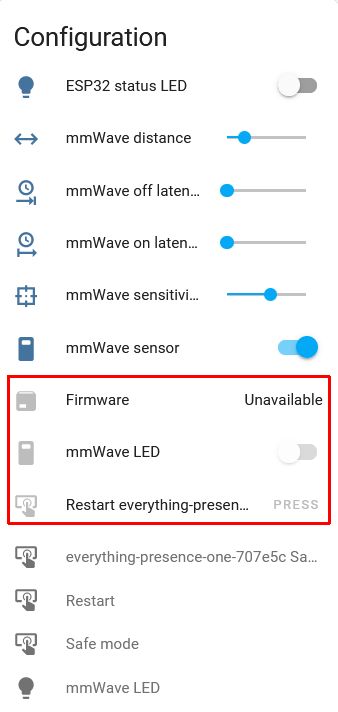
The "room" substitution is not the only thing messed up in the 2023.6.5 update, so are the entities for "Firmware", "mmWave LED" and "Restart everything-presence-one-XXXXXX". They're greyed out and when clicked on, show "This entity is no longer being provided by the esphome integration. If the entity is no longer in use, delete it in settings.

Please can you share a before and after YAML, this is a breaking change for me :-( I am using ESPHome only
Go to ESPHome (add-on) -> Edit -> replace the substitution "room" with "friendly_name" -> Save -> Install.
The "room" substitution is not the only thing messed up in the 2023.6.5 update, so are the entities for "Firmware", "mmWave LED" and "Restart everything-presence-one-XXXXXX". They're greyed out and when clicked on, show "This entity is no longer being provided by the esphome integration. If the entity is no longer in use, delete it in settings.
thanks, I needed to delete and re-add to HA
Please can you share a before and after YAML, this is a breaking change for me :-( I am using ESPHome only
Go to ESPHome (add-on) -> Edit -> replace the substitution "room" with "friendly_name" -> Save -> Install.
The "room" substitution is not the only thing messed up in the 2023.6.5 update, so are the entities for "Firmware", "mmWave LED" and "Restart everything-presence-one-XXXXXX". They're greyed out and when clicked on, show "This entity is no longer being provided by the esphome integration. If the entity is no longer in use, delete it in settings.
These items have been renamed and moved and or disabled. So you can delete the old ones and enable the new ones (if you need them enabled)
thanks, I needed to delete and re-add to HA
These old entities become deletable after a HA restart.
thanks, I needed to delete and re-add to HA
These old entities become deletable after a HA restart.
maybe you or someone else can help me? i have an entity that was created cause of this issue that i cannot delete and i would like to make it gone

I think this entity is still provided by the device, it's just disabled. You can't delete it because, well, it still exists.
On Tue, Jul 18, 2023 at 8:53 AM Menz01 @.***> wrote:
thanks, I needed to delete and re-add to HA
These old entities become deletable after a HA restart.
maybe you or someone else can help me? i have an entity that was created cause of this issue that i cannot delete and i would like to make it gone [image: image] https://user-images.githubusercontent.com/31291495/254268807-107512d1-e6a8-4a0f-aa45-d07df9e85e38.png
— Reply to this email directly, view it on GitHub https://github.com/EverythingSmartHome/everything-presence-one/issues/80#issuecomment-1640158053 or unsubscribe https://github.com/notifications/unsubscribe-auth/AAZDWBW6OMJWKPZ6PCK2W63XQ2BK7BFKMF2HI4TJMJ2XIZLTSOBKK5TBNR2WLJDUOJ2WLJDOMFWWLO3UNBZGKYLEL5YGC4TUNFRWS4DBNZ2F6YLDORUXM2LUPGBKK5TBNR2WLJDUOJ2WLJDOMFWWLLTXMF2GG2C7MFRXI2LWNF2HTAVFOZQWY5LFUVUXG43VMWSG4YLNMWVXI2DSMVQWIX3UPFYGLLDTOVRGUZLDORPXI6LQMWWES43TOVSUG33NNVSW45FGORXXA2LDOOJIFJDUPFYGLKTSMVYG643JORXXE6NFOZQWY5LFVE2TGOJRG4ZDINZWQKSHI6LQMWSWS43TOVS2K5TBNR2WLKRRG44TINBSGA2DANFHORZGSZ3HMVZKMY3SMVQXIZI . You are receiving this email because you authored the thread.
Triage notifications on the go with GitHub Mobile for iOS https://apps.apple.com/app/apple-store/id1477376905?ct=notification-email&mt=8&pt=524675 or Android https://play.google.com/store/apps/details?id=com.github.android&referrer=utm_campaign%3Dnotification-email%26utm_medium%3Demail%26utm_source%3Dgithub .
Try this:
- Enable the entity, then delete.
- If enabling fails, do a full HA restart, then delete.
Try this:
- Enable the entity, then delete.
- If enabling fails, do a full HA restart, then delete.
THANK YOU!!!! #2 is what did it but #1 is also necessary. my OCD thanks you!!
Sorry guys, this was an unintentional change - it was only intended to affect new users, didn't realise you would get prompted to update which would cause this issue.
Will be more careful in the future!

Try this:
- Enable the entity, then delete.
- If enabling fails, do a full HA restart, then delete.
THANK YOU!!!! #2 is what did it but #1 is also necessary. my OCD thanks you!!
I don't know how I managed it but I had deleted so many things (from HASS and ESPHome), restarted, deleted again, renamed the remaining ESPHome entity to wookie (because aaaaahrg). Then I disabled ESPHome while I flashed it cleanly from https://everythingsmarthome.github.io/everything-presence-one/. Then when I added it back to ESPHome, it "adopted" and reflashed the device again, after which my old "wookie" device came back to life, but this time with sensors being published to the UI. I took the chance and renamed it to the correct name and ... It seems to have sticked?!? I'm never touching it again!

Hi, sorry just to clarify. I faced this issue and even if my config has "room" and "friendly_name" all my devices sensor are called "binary_sensor.everything_presence_one_2707bxxx_xxx" instead of "binary_sensor.[friendly_name]_xx".
So it's a issue or a breaking change? Just to understand if I have to rename all my automation or wait for a fix.
