

 Embarcadero
Error on Mac M1
If I try to use DelphiFMX in Python I get this error:
not valid for use in process: Trying to load an unsigned library), '/usr/local/lib/libDelphiFMX.dylib'
Here is the full terminal dump:
>>> from delphifmx import *
Traceback (most recent call last):
  File "<stdin>", line 1, in <module>
  File "/opt/homebrew/lib/python3.9/site-packages/delphifmx/__init__.py", line 82, in <module>
    package = new_import()
  File "/opt/homebrew/lib/python3.9/site-packages/delphifmx/__init__.py", line 72, in new_import
    ld = loader.create_module(spec)
ImportError: dlopen(/opt/homebrew/lib/python3.9/site-packages/delphifmx/OSXARM64/libDelphiFMX.dylib, 0x0002): tried: '/opt/homebrew/lib/python3.9/site-packages/delphifmx/OSXARM64/libDelphiFMX.dylib' (code signature in <2D627531-CB8E-3D97-BE24-3045066492E7> '/opt/homebrew/lib/python3.9/site-packages/delphifmx/OSXARM64/libDelphiFMX.dylib' not valid for use in process: Trying to load an unsigned library), '/usr/local/lib/libDelphiFMX.dylib' (no such file), '/usr/lib/libDelphiFMX.dylib' (no such file)

@MiScCX are you using the latest version on PyPI?
Can you run the following code and share the result?
- codesign --verify --verbose libDelphiFMX.dylib
- codesign -dv --verbose=4 libDelphiFMX.dylib
- considering your root is currently the "/opt/homebrew/lib/python3.9/site-packages/delphifmx/OSXARM64/" folder.

Here is the result:
OSXARM64 % codesign --verify --verbose libDelphiFMX.dylib
libDelphiFMX.dylib: code object is not signed at all In architecture: arm64
OSXARM64 % codesign -dv --verbose=4 libDelphiFMX.dylib
libDelphiFMX.dylib: code object is not signed at all
Update: I created a code signing certificate and I trusted in any case...after this is signed the libDelphiFMX.dylib with result:
codesign -vvvv libDelphiFMX.dylib
libDelphiFMX.dylib: valid on disk libDelphiFMX.dylib: satisfies its Designated Requirement
But after I tried it again I have this now:
Python 3.9.10 (main, Jan 15 2022, 11:40:53) [Clang 13.0.0 (clang-1300.0.29.3)] on darwin Type "help", "copyright", "credits" or "license" for more information.
from delphifmx import * Traceback (most recent call last): File "
", line 1, in File "/opt/homebrew/lib/python3.9/site-packages/delphifmx/init.py", line 82, in package = new_import() File "/opt/homebrew/lib/python3.9/site-packages/delphifmx/init.py", line 72, in new_import ld = loader.create_module(spec) ImportError: dlopen(/opt/homebrew/lib/python3.9/site-packages/delphifmx/OSXARM64/libDelphiFMX.dylib, 0x0002): Library not loaded: \udcb0\udcc9 F+C Referenced from: /opt/homebrew/lib/python3.9/site-packages/delphifmx/OSXARM64/libDelphiFMX.dylib Reason: tried: '$ORIGIN/\udcb0\udcc9F+C' (no such file), '$ORIGIN/\udcb0\udcc9F+C' (no such file), '/opt/homebrew/lib/\udcb0\udcc9F+C' (no such file), '/opt/homebrew/lib/\udcb0\udcc9F+C' (no such file), '\udcb0\udcc9F+C' (no such file), '/usr/local/lib/\udcb0\udcc9F+C' (no such file), '/usr/lib/\udcb0\udcc9F+C' (no such file), '/opt/homebrew/lib/python3.9/site-packages/delphifmx/OSXARM64/\udcb0\udcc9F+C' (no such file), '/usr/local/lib/\udcb0\udcc9F+C' (no such file), '/usr/lib/\udcb0\udcc9`F+C' (no such file)
There is a log file in delphifmx package folder. Can you paste it here, please?
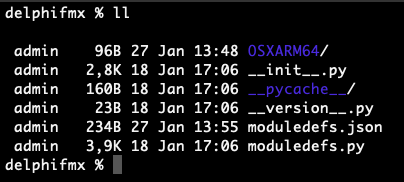 Is this the right folder? I can´t see a log...
Yes, it is. It looks like it doesn't even tried to launch the shared library.
well in the error messages above there is a hint about "not loading de dylib"
ImportError: dlopen(/opt/homebrew/lib/python3.9/site-packages/delphifmx/OSXARM64/libDelphiFMX.dylib, 0x0002): Library not loaded: \udcb0\udcc9`F+C
Can you try to uninstall Python from homebrew and try the standard installer from python.org?
https://www.python.org/ftp/python/3.9.10/python-3.9.10-macos11.pkg
Okay done... I had the same error about the dylib missing signature and i used codesing with my own certificate...OK No error when I run the helloworld code but also no output nor anything...just hanging cursor
The new pyhton path is now: /Library/Frameworks/Python.framework/Versions/3.9/lib/python3.9/site-packages/delphifmx/OSXARM64
But there is still no log file
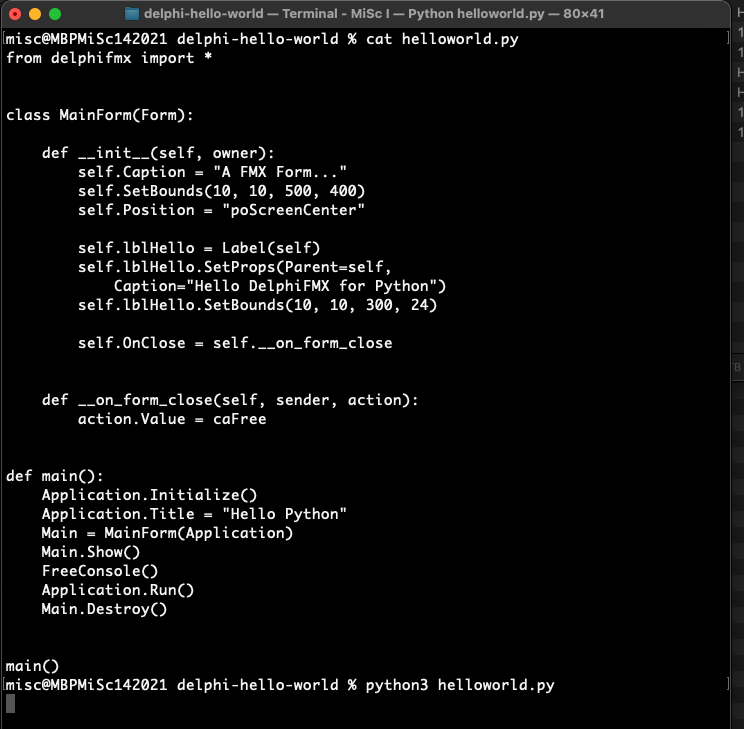
Try it again and when you start running the script, pay attention to the Python launcher icon on the dock.
ah sorry ... yes there is the python launcher jumping all the time...but no window
hmm... I saw it happening once.
Try the following, just to give me a change to figure out what is actually happening:
- run your script and wait for Python's launcher to hang;
- right click on jumping launcher, then click hide;
- click on an empty place on your desktop;
- come back to the launcher and take a left click.
no change...
https://user-images.githubusercontent.com/35303768/151563060-e8d51cf2-7e44-4d26-9310-a8578201df93.mov
The GUI is being hold by the console, preventing it to be shown. I have a fix in mind.
Keep trying the hide and show workaround meanwhile, it will show some time...
@MiScCX I was able to reproduce this issue after upgrading my macOS to Monterey. It looks like something regarding the SDK is going wrong. I'm doing some further investigations and will be back with news.
@MiScCX we're still facing issues with the Python launcher on macOS. Can you try it under Conda environment?
We are definitely running into a deadlock. You can follow in the links bellow:
https://quality.embarcadero.com/browse/RSP-37717?filter=-2 https://feedbackassistant.apple.com/feedback/9963518
I will try to provide a workaround soon.