
Android-FilePicker
 Android-FilePicker copied to clipboard
 DroidNinja
How to customize "DONE" text, back arrow icon and the active tab text color ?
Hello, I'm looking for a way to customize the "DONE" text and the back arrow icon. How to change the color of "DONE" text ? How to change the color of back arrow icon, or How to replace that icon by another custom icon ?
I tried to override some colors but not work.
<!-- SlidingTab --> <color name="sliding_tab_text_color_active">#fe0a5a</color> <color name="sliding_tab_text_color_shadow">#fe0a5a</color>
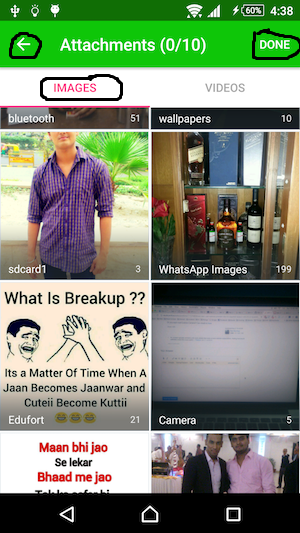
Thanks.

Hi @BoumBam
I'm looking for a way to customize the "DONE" text and the back arrow icon Done is the menu and to change color you need to look for "itemTextAppearance".
For TabLayout and the color of tabs which are (Images and Videos). This is very easy you can add your own color by just override the theme like as below.
<style name="PickerTabLayout" parent="Widget.Design.TabLayout">
        <item name="tabBackground">@android:color/white</item> //Give you own color for background.
        <item name="tabSelectedTextColor">@android:color/holo_green_light</item> //Color for current active tab
        <item name="tabTextColor">@color/colorPrimary</item> //Color for all other tab
        <item name="tabGravity">fill</item>
        <item name="tabMaxWidth">0dp</item>
 </style>

Hi @Rajnish23 Thanks for your answer. But what about the color of the "DONE" text and the back arrow ?
For changing text color of "Done" you can use <item name="actionMenuTextColor">@android:color/black</item> in your LipAppTheme which you need to override.
@Rajnish23 you are magic. For the back arrow color, do I have to change it by my custom image ? How to make it black ?
If you have time of course :).
Thanks a lot.
@BoumBam
I think you cannot add your own custom Image.
I you check the code the icon is added using supportActionBar?.setDisplayHomeAsUpEnabled(true) . You need to check on how to manipulate homeAsUpIndicator.
Everything is customizable through theme options. Will add this back button to the same as well.

Everything is customizable through theme options. Will add this back button to the same as well.
But I tried:
   <style name="LibAppTheme" parent="Theme.AppCompat.Light.NoActionBar">
        <item name="colorControlNormal">@color/color_black</item>
    </style>
As suggested by that answer: https://stackoverflow.com/a/31103586/12943545
But it does not work.
Any other solution ?