
tutorial
 tutorial copied to clipboard
 DjangoGirls
sqlite connection issue on deployment
Issue description
When I deploy after the chapter on templating and using the {%for command, there is some sort of database problem. Several other people have had the issue: https://www.pythonanywhere.com/forums/topic/5662/
./manage.py shell was able to talk to the database:
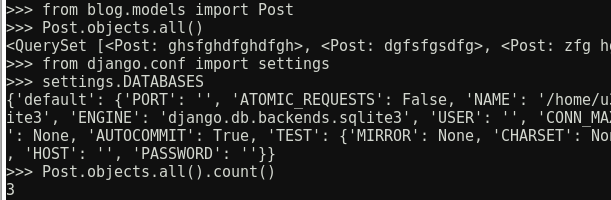
but when I loaded the front page, the HTML was delivered missing the {%for section completely, so all I had was the heading.
Following the "fix" given on the forum post linked above, I copied my local db.sqlite3 file to PythonAnywhere and restarted the instance, upon which it worked perfectly.
I can't find any steps I have missed, and it worked correctly on my local machine before deploying. Just to be clear, the above screenshot is from before I replaced the DB file - so the content was there but it was not being rendered in the web page for some reason.
Language
I doubt it; I'm reading the US English version.
Operating system
I'm on Linux (Mint)

Hi @u38cg, thank you for reporting that issue.
Can you confirm, that ./manage.py worked on PythonAnywhere web console or locally on your computer? The good practice here is that the database should not be stored in a git repository and usually "development" and "production" databases differ. Maybe that's not stated clearly enough but when you deploy the first time, you should create superuser on PythonAnywhere and then recreate blog posts.

Yes, the screenshot above of the ./manage.py shell was taken on PythonAnywhere. They were definitely two different databases, before I copied my local one over.
So you're claiming that on PythonAnywhere in manage.py shell you have 3 posts, but they are not visible on the website? How these 3 posts were added then?
Yes, that's right. They were added and visible in the admin interface, but when the front page of the site was loaded, the template wasn't populated.
From a perspective of Django there's no difference between Django Admin and template. Would guess that for some reason your posts were not yet published. Can you confirm that?
No, they were definitely published - one of the things I tried doing was changing the published dates to several weeks prior in case there was timezone shenanigans going on.
The problem the other users in that forum thread were facing was different: They expected their locally entered blog posts to also show up on the deployed blog, while the Django Girls tutorial assumes local posts are for testing only and that the user will create separate ones at this step of the tutorial:
[...] Try adding /admin/ to the end of the URL, and you'll be taken to the admin site. Log in with the username and password, and you'll see you can add new Posts on the server -- remember, the posts from your local test database were not sent to your live blog.
Once you have a few posts created, you can go back to your local setup (not PythonAnywhere). From here you should work on your local setup to make changes. This is a common workflow in web development – make changes locally, push those changes to GitHub, and pull your changes down to your live Web server. This allows you to work and experiment without breaking your live Web site. [...]
To rehash: You (@u38cg) assert that even though you actually have created blog posts on PythonAnywhere and can query them in the Django shell there, they aren't showing up. You've made sure that their publication date is well in the past and you've tested the same code locally where it did work correctly and showed the locally created posts.
That's admittedly rather strange, but there's still things you can test to narrow down the cause.
The next thing I'd test, would be whether the publication logic works as expected.
In the Django shell (./manage.py shell) on PythonAnywhere try something like this:
from blog.models import Post
from django.utils import timezone

# Output current date & time:
print(timezone.now())

# Output details about posts:
for post in Post.objects.all():
    print(post)
    print('publication date:', post.published_date)
    print('is published:', post.published_date <= timezone.now())
    print()  # output empty line for readability

# Check the filter used in the blog.views.post_list() view:
Post.objects.filter(published_date__lte=timezone.now()).order_by('published_date').count()
... and see if that results in anything unexpected.

Hey everyone -
I was having the same issue, despite creating new entries in the admin console on the PythonAnywhere server.
The fix is rather simple. You have to reload the site on the PythonAnywhere console for the entries to show. To get there, you need to go to the "web" tab on your user settings page:


@SiddHealth Thanks for the solution. I was having the same issue. Now it's resolved.

