
dependency-track
 dependency-track copied to clipboard
 DependencyTrack
Component "Projects" tab: No Column Sort
Current Behavior:
The "Projects" tab for a component displays two columns for the projects that have the component as a dependency:
- Name
- Version Each column displays an ico indicating that the column can be sorted. Clicking will change the orientation of the icon and also show which column is "active".
The sort does not seem to work.
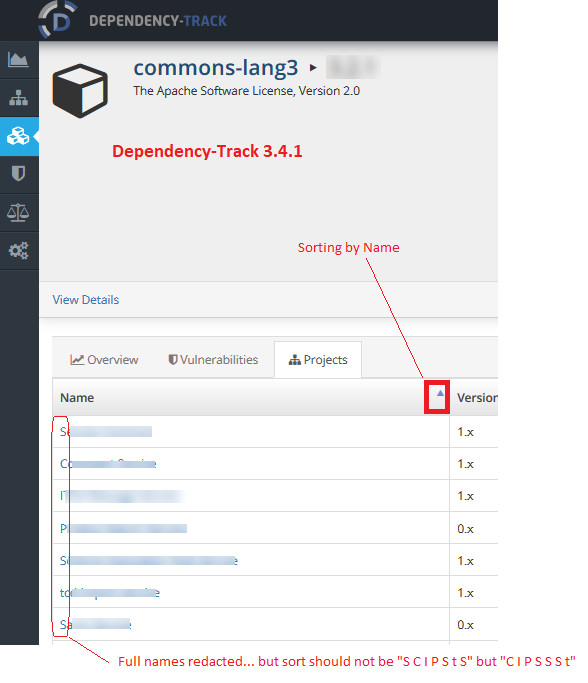
Steps to Reproduce:
- Navigate to Components
- Select a component that is used in several projects
- When viewing the component, click on "Projects" tab
- Sort the projects by listing, both by name column, and by version column.
Expected Behavior:
Projects listing sort should be functional.
I was seeking to sort the listing so that I could more easily compare usage of two different components with each other. ie, compare two sorted project lists.
Environment:
- Dependency-Track Version: 3.4.1
- Distribution: [ Executable WAR ]
- BOM Format & Version: CycloneDX v1
- Database Server: [ PostgreSQL ]
- Browser: Firefox


note to self: The query this UI element uses returns a List of Dependency objects and the Project is the only side of the data which is displayed. Ordering can only be performed on candidate objects (Dependency), not child objects.
Therefore, in order to resolve this issue, a new API will need to be created, specific to usage, which would return a List of Project objects. This would allow the name and version fields to be ordered.
@stevespringett, this is still applicable on the components screen. The project name column is not sortable. This would be useful... I was just needing it today when trying to work out the exact list of unique projects that use any of a variety of components that share a groupId (but whose artifactIds vary too much to be useful in a search).
Close this and open a new issue?
Thanks for the clarification @msymons.
So if I understand correctly. In DT 4.x, when you go to components and perform a search, the project name column in the search results is not sortable. Is that correct?
If so, No, don't open a new issue. This issue seems to cover the new UI as well.
There's no option to sort the "project name" column on this screen in v4.5.0 or v4.6.0-SNAPSHOT (24/07/22)
