
angular2-multiselect-dropdown
 angular2-multiselect-dropdown copied to clipboard
Published
20 hours ago •
 CuppaLabs
CuppaLabs
Custom c-item causes empty label with width 120px
I am trying to use a custom c-item using the provided samples. However, my dropdown shows all items indented.
html:
<angular2-multiselect [data]="itemList" formControlName="selectedItems" [settings]="settings"
    (onSelect)="onItemSelect($event)" (onDeSelect)="OnItemDeSelect($event)"  (onSelectAll)="onSelectAll($event)" (onDeSelectAll)="onDeSelectAll($event)">
    <c-item>
      <ng-template let-item="item">
        <label style="color: #333;min-width: 150px;">{{item.itemName}}</label>
        <img [src]="item.image" style="width: 30px; border: 1px solid #efefef;margin-right: 20px;" />
        <label>Capital - {{item.capital}}</label>
      </ng-template>
    </c-item>
  </angular2-multiselect>
ts:
this.settings = {
          text:"Select Countries",
          selectAllText: 'Select All',
          unSelectAllText: 'UnSelect All',
          enableSearchFilter: true,
          classes: "myclass custom-class",
          showCheckbox: true,
          primaryKey: 'id',
          labelKey: 'itemName'
        };
    this.myForm = this.fb.group({
      selectedItems: new FormControl(this.selectedItems, []),
    });
css
.custom-class {
  color: #f00;
}
.custom-class .c-token{
  background: #38d574 !important;
}
.custom-class .pure-checkbox label::before {
  border-color: #38d574 !important;
}
.custom-class .pure-checkbox input[type="checkbox"]:checked + label[_ngcontent-c1]:before {
  background: #38d574 !important;
}
angular.json
"styles": [
              "node_modules/font-awesome/scss/font-awesome.scss",
              "node_modules/angular-bootstrap-md/scss/bootstrap/bootstrap.scss",
              "node_modules/angular-bootstrap-md/scss/mdb-free.scss",
              "node_modules/angular2-multiselect-dropdown/themes/default.theme.css",
              "src/styles.scss"
            ]
This is how the dropdown looks like
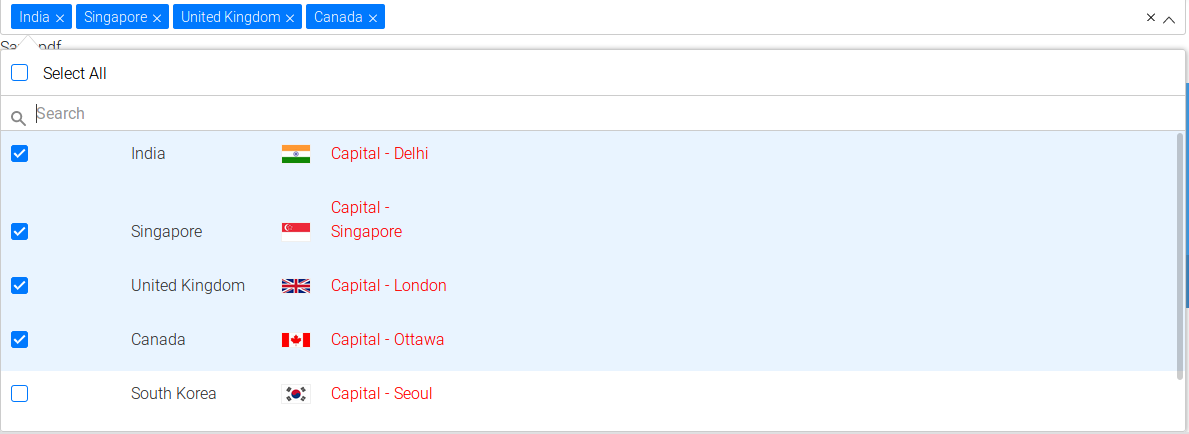 which is different to the example
What could cause this issue?

Please help me this custom template
 <ng-template let-item="item">
   <label style="color: #fff;min-width: 150px;"></label>
   <img [src]="item.image" style="width: 30px; border: 1px solid #efefef;margin-right: 20px;" />
   <label>Capital - </label>
 </ng-template>
</c-item>  ```
is not reflecting in my project.

i want to add custom template in my project. please help me .
why it's not reflecting @pickardjoe
