
dockbar
 dockbar copied to clipboard
 CatsJuice
A macOS-like dock component made with WebComponents

dockbar
A macOS like dockbar component made with Web Components
that can be used in any framework.



Install
-
NPM
npm install dockbar --save -
CDN
ESM(Example)
<head> <script type="module" src="https://unpkg.com/dockbar@latest/dockbar.js"></script> </head>IIFE(Example)
<head>
  <script src="https://unpkg.com/dockbar@latest/dockbar.iife.js"></script>
</head>
Go to Codepen for a quick try.
Usage
Basic usage
<body>
  <dock-wrapper>
    <dock-item>1</dock-item>
    <dock-item>2</dock-item>
    <dock-item>3</dock-item>
    <dock-item>4</dock-item>
  </dock-wrapper>
</body>
It is recommended to use a custom element inside dock-item, so that you can customize the content of dock-item.
<dock-wrapper>
  <dock-item>
    <div class="my-element"></div>
  </dock-item>
</dock-wrapper>
You may need to look at docs if you are using a framework like Vue.js or React.
Custom Style
Apply class to dock-wrapper and dock-item and customize your own style.
For more, see Configuration.
Problems
There are some problems yet to be solved:
- [ ] SSR compatibility
It does not work will in SSR framework like Nuxt.js. For now you have to render it inside
ClientOnly, and import component asynchronously. - [ ] Style asynchronous loading causes a flash on init
If you are not using by
iife, it may cause a flash on init, because the style is loaded asynchronously. For now you could resolve this by applying a style:<head> #dock { visibility: hidden; } #dock:defined { visibility: visible; } </head> <body> <dock-wrapper id="dock"> </dock-wrapper> </body>
Configuration
| Property | Type | Default | Description |
|---|---|---|---|
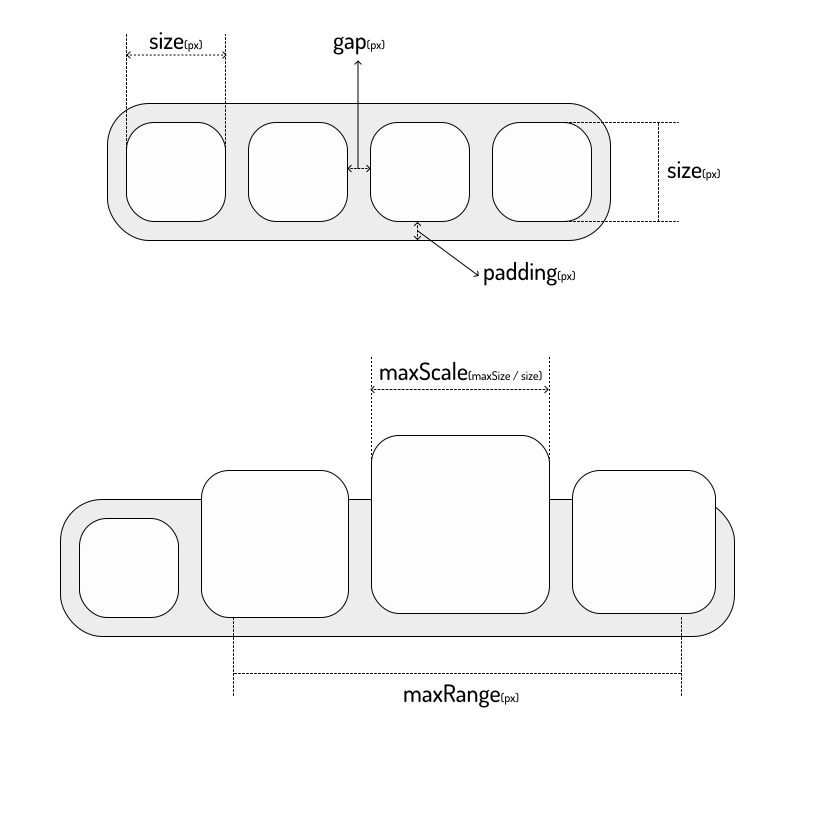
size |
number |
40 |
The size of dock-item in px, see Sizes |
padding |
number |
8 |
The padding of dock-wrapper in px, see Sizes |
gap |
number |
8 |
The gap between dock-item in px, see Sizes |
maxScale |
number |
2 |
The max scale of dock-item, see Sizes |
maxRange |
number |
200 |
The max range of dock-item that will scale when mouseover in px, see Sizes |
disabled |
boolean |
false |
Disable the scale effect |
direction |
horizontal | vertical |
horizontal |
The direction of dock-items |
position |
top | bottom | left | right |
bottom |
The position of dock-wrapper, will affect the scale origin |
Sizes
 CatsJuice