
ChroMapper
 ChroMapper copied to clipboard
 Caeden117
Add V3 Light System in Chromapper
V3 Light System
Copied from
V3CONTROL.md
V3 Light system is implemented(roughly). Currently The Second plaform is supported. You will see the v3 light grids after entering this platform.
Display UI Panel
The v3 light configuration panel is one of the items in the right panel. You can press tab and you will see a light aperture displaying Add V3 Lights on hover. You can click the button to show v3 light UI panel. There is also a keybind for displaying the panel. The default keybind is Shift + T.
Initially on the light grid, lightColorEvent is above the plane and lightRotationEvent is under the plane. The event above the plane could be placed. Clicking Switch To Rotation/Color will change the current panel and flip the light grid as well. There is also a keybind for this button. The default keybind is Shift + R.
Change parameters & Placement
You can change the parameter inside the UI panel to change the hovering note's data. Besides, the key bindings for old events may also affect the data. For example, changing to blue color will also change the color field in the UI.
Left click will place the note on the grid. Placing multiple notes on the same position will stack them. This is possible because they may have different filters.
Interact with Selection
When there is exactly one light event selected, UI will display the data inside this note. During the selection, you can change the data inside the UI, and finally click Apply to note to store the data to the note. If you place a note after the selected note, the new placed note will be treated as a subnote of the selected note(in the json format, it will be the additonal EventData).
After unselecting all, UI will display the hover note 's data again.
For box selection, it will automatically select all the lightColorEvent and lightRotationEvent within the time and lanes, regardless of their heights(or Y-axis).
Create Template
Manually input various parameters is boring. In such case, you can click Create Template to storage a note to the template. If non selected, hover note will be the template. If one selected, the selected note will be the template. Left click the button will restore the template to the UI panel.
Renaming and deleting the template button is same as the bookmark, by right clicking and middle clicking, respectively.
Note: Currently the storage is not persistent, which means it will get lost after exiting the map. I'm not sure where to store if we want it to be persistent.
Features could be improved
For new light systems:
- The position of each light/object in
The Secondenvironment. Currently I just place them at looks-good positions. - The formula of how rotation works. Especailly combine X axis rotations with Y axis ones together.
- In Chromapper, There is only light tube, but no light beam, which makes the light performance not very similar(Or maybe tuning the HDR/bloom factor?).
- Currently
colorField in the UI is only a number, maybe it could be replaced by color palette. - Some sanity check after filling the input field.
- Localization for UI.
For old events:
- Delete unused lanes for
Events Grid, likelaser speedandring rotation. - Rewrite ring zoom function. In previous version
Valuefield has no impact on the zoom note, but I think it has changed since some version.
Others
There are still many features needs to be improved. I make this PR for testing light/rotation/platform effects and collecting suggestions. Overall, any suggestion is welcomed. If you want to test it, please manually backup the song ahead in case of any unknown bug exploding the map.

Godspeed, valiant hero! Haven't tested it out yet (don't have unity installed) but this looks nice! I like the features you're putting in this! I'll comment with any issues or thoughts I run into once unity gets installed.

HOLY MOTHER OF-
First off, it would be nice to implement some sort of stop motion light preview like how the official editor has.
Secondly, WOW IS THE "Add V3 lights" MENU CLUTTERED. The menu is really cluttered, making it almost unusable to people who are new to V3 lighting. And the terminology used here doesn't allow for parity with the official editor, either. I suggest that working on prettifying this UI be a priority before pushing this to the main repo, but that's just what I'd do.
A few of my notes from testing:
Animations and rotations will keep rolling even after I pause the song. The flags have no lights correlating to them. When rotating the big ring on the InOutQuad easing, it'll have an odd bounce to it when it gets to its final position. If a light has an event in it's lane, it'll pulse on, and then fade out when I pause, even when the light is off.
Secondly, WOW IS THE "Add V3 lights" MENU CLUTTERED. The menu is really cluttered, making it almost unusable to people who are new to V3 lighting. And the terminology used here doesn't allow for parity with the official editor, either. I suggest that working on prettifying this UI be a priority before pushing this to the main repo, but that's just what I'd do.
I have also thought of UI designing. For official editor, the problem is that it is really scattered, not cluttered. EventBoxes are on the right, cannot be configured before placement, and instantly apply to notes after modification. While EventDatas are on the left, can be configured and you need to delete and put the note to update the data. Besides, parameters in EventBoxes are not well-ordered(e.g. Time Distribution is headerless, while Brightness Distribution has a title). These are some points I try to avoid.
For prettifying the UI, Changing the size/font size could be a solution. For beginners, maybe adding some tooltip when hovering on the label might help? But I still think there is always some extent of learning curve to use new light system.
Weave Environment Update
- Add Weave into Platforms.
- Rewrite rotation logic. Now rotating X and Y together should be same as offical does.
- Add Light beam. It is simply a texture with gradient.
- Some other bug fixes(e.g. index error when there is no v2 light; supporting filter when partition number is greater than the total light count)
Used [V3] Sharks – Plasma as the test map for Weave Environment.
This is super cool. I have been wanting to try V3 lights for awhile but haven't been able to because I am a quest user. I have run into a few bugs but It could just be because I'm on a Mac or just something wrong with my build, but I though I would mention them anyway.
Bug 1: Some of the track names are shifted over and overlap.
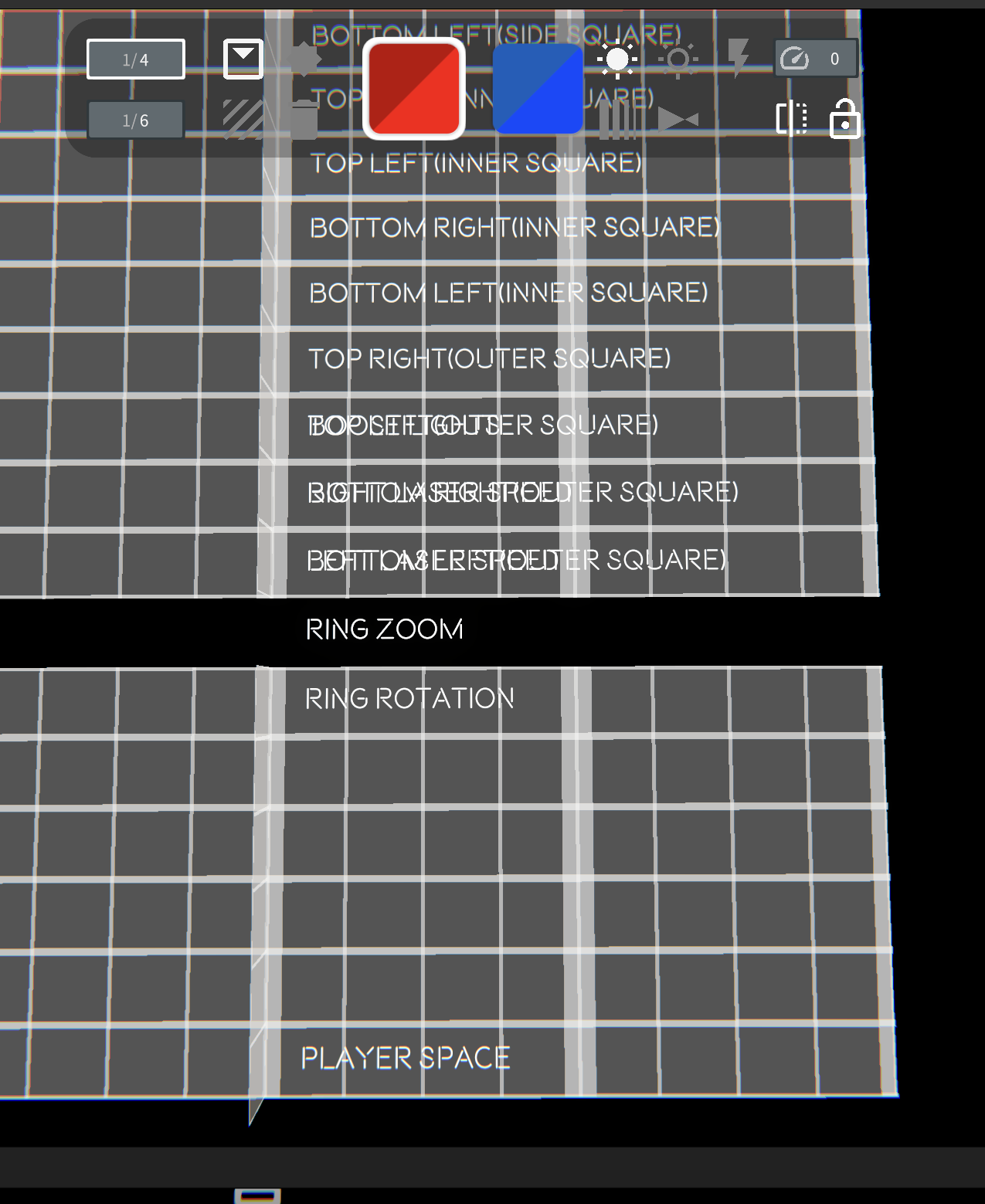
Bug 2: If you save and exit the map, then open it again, it seems to limit the number of events too 2 events per track per beat.
Here is an example from the map you used (Sharks - Plasma)
Before Saving

After Saving and Reloading
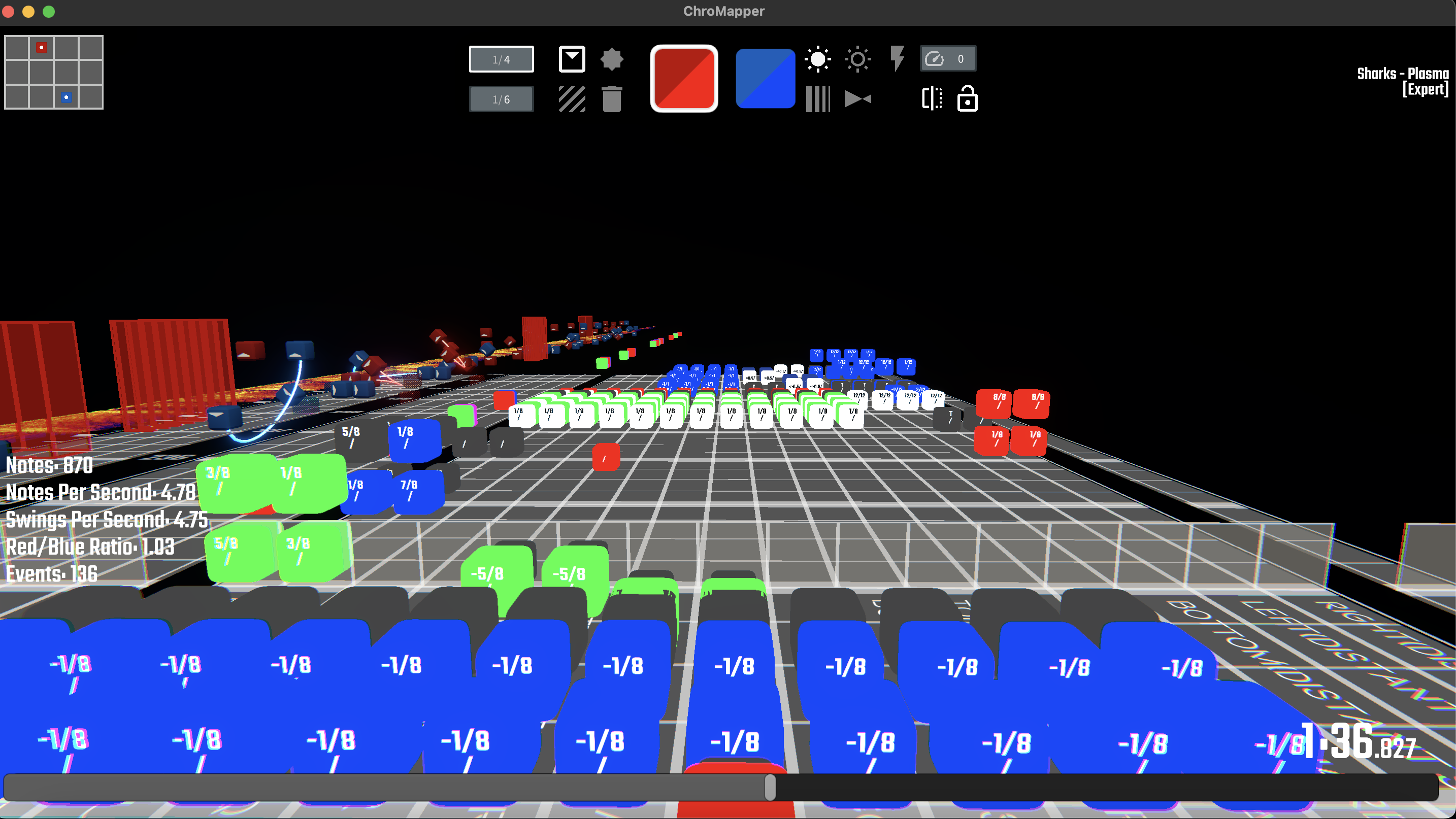
The first image also seems to have some events that are smaller than the rest that are also removed after saving.
Hopefully this helps you in some way, and thanks for all your hard work to make Chromapper even better.

Thanks for your testing.
Bug 1: Some of the track names are shifted over and overlap.
Fixed.
Bug 2: If you save and exit the map, then open it again, it seems to limit the number of events too 2 events per track per beat. Here is an example from the map you used (Sharks - Plasma) Before Saving
Fixed.
The first image also seems to have some events that are smaller than the rest that are also removed after saving.
The smaller notes are additional notes attached to the previous big notes. If you use official editor, the smaller note is the note when you click on some notes and the one you put on the individual lane.
In your image, the reason of disapperance of smaller notes is that the big notes are already passed the threshold and recycled. So they are recycled, too.
Finally got around to testing a bit with this. The preview looks pretty accurate to me. 👍
Bugs:
- Pressing
defaulton v3 lighting will change the queued v3 colour to red even you've selected blue or white previously. v2 queued colour is unaffected. - Weave environment currently uses TheSecond colour pallete. (Boost lighting is green and pink instead of white and pink.)
Notes:
-
UI seems to have some placeholder
-options which cause exceptions when selected or using them. -
Some sanity check after filling the input field.
Yup. We'll want a clamp on the ui input fields to prevent non-positive sections/partions. I can cause a DivideByZeroException by setting partition to 0 and placing an event. May also want to gracefully handle those ~~because my map has those somewhere~~.

Pressing
defaulton v3 lighting will change the queued v3 colour to red even you've selected blue or white previously. v2 queued colour is unaffected.
It indeed looks inconsistent with the top UI. The intention of having a default button is when you are placing an event with subnotes, there is no direct way to delete the subnote. So pressing default will restore the note.
Actually default button is an event box with most fields 0(So it will always be red color). It is a fixed value and won't change along with the top UI.
Weave environment currently uses TheSecond colour pallete. (Boost lighting is green and pink instead of white and pink.)
Will fix it later.
UI seems to have some placeholder - options which cause exceptions when selected or using them.
I'm making it behave similar like note editor for group editing. Can you provide steps to reproduce the exception?
Some sanity check after filling the input field.
It would be a lot of works to do. But if something works in game but doesn't work in CM, it might be that official will have some kinds of clamping or something. You could provide me such notes and I will figure out how they work in game.