
tket
 tket copied to clipboard
 CQCL
CQCL
Circuit renderer displays the wrong angle value after conversion to qiskit and back
Small bug pointed out by @alessum.
@DNA386
Using pytket v1.11.1
from pytket import Circuit
from pytket.circuit.display import render_circuit_jupyter
from pytket.extensions.qiskit import qiskit_to_tk, tk_to_qiskit

circ1 = Circuit(2).CX(0, 1).Rz(0.2, 1).CX(0, 1)
render_circuit_jupyter(circ1)
The circuit diagram looks as expected
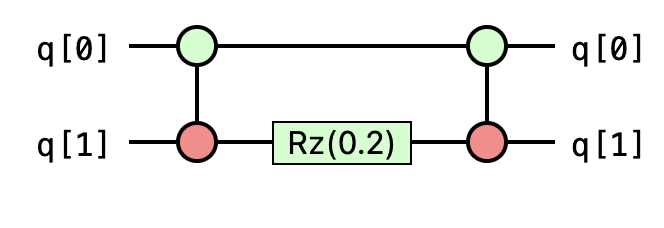
However if we convert to qiskit and then back the diagram shows the angle (0.2*pi). It seems to be picking up an extra factor of pi due to the different angle conventions of qiskit and pytket.
circ2 = qiskit_to_tk(tk_to_qiskit(circ1))
render_circuit_jupyter(circ2)
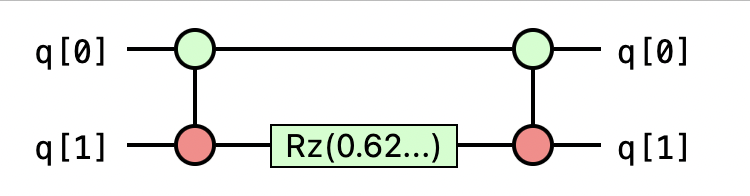
However the underlying pytket Circuit has the expected angle of 0.2.
print(circ2.get_commands())


This is very weird, since the circuits circ1 and circ2 are identical (except for the names).

This was caused by the renderer not fully displaying the decimal expansion with a symbolic factor of pi. The entire expansion looks like Rz(0.62831.../pi) but the factor of pi wasn't apparent in the display.
In the pytket 1.13.2 release the renderer has a [crop long parameters] button (on by default). If you turn this off the user can view the full expansion.
Maybe we should look into the qiskit_to_tk evaluating the factor of pi numerically after the conversion as the default display still looks a little confusing in case where you are converting back and forth.
![github-actions[bot] avatar](https://avatars.githubusercontent.com/in/15368?v=4 "Published by a pub.dev verified publisher")