
openpose
 openpose copied to clipboard
 CMU-Perceptual-Computing-Lab
Transformation the skeleton coordinates from fixed frame into a mobile frame linked to the skeleton
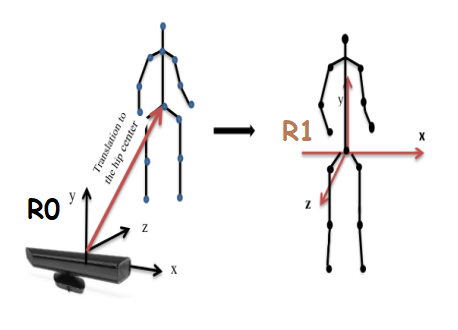
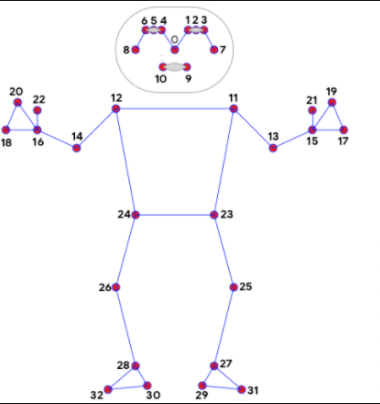
Hello, I have the coordinates [x, y, z] of the joints of the skeleton in a fixed frame R0 linked to the camera. I want to make a python script to transfer these coordinates from the fixed frame R0 linked to the camera, to express them in a mobile frame linked to the skeleton of origin the middle of the body. for example the middle of the segment Joint _24 and Joint _23 and an axis passing through the joint _0. the frame R1 must be stuck to the skeleton, that is to say it will follow the movements of the skeleton. I want my python script to provide in output the coordinates of the joints in the mobile frame R1. It is clearer in this diagram.
{ "pose": {"joint_0":[0.057,0.708,-2.237],"joint_1":[0.04,0.741,-2.232],"joint_2":[0.025,0.756,-2.271],"joint_3":[0.013,0.758,-2.276],"joint_4":[0.076,0.737,-2.227],"joint_5":[0.091,0.746,-2.256],"joint_6":[0.102,0.75,-2.276],"joint_7":[-0.004,0.744,-2.271],"joint_8":[0.11,0.741,-2.286],"joint_9":[0.03,0.677,-2.237],"joint_10":[0.071,0.669,-2.237],"joint_11":[-0.122,0.55,-2.307],"joint_12":[0.205,0.543,-2.354],"joint_13":[-0.172,0.273,-2.302],"joint_14":[0.248,0.266,-2.328],"joint_15":[-0.198,0.05,-2.291],"joint_16":[0.275,0.048,-2.317],"joint_17":[-0.226,-0.022,-2.291],"joint_18":[0.298,-0.02,-2.338],"joint_19":[-0.197,-0.027,-2.302],"joint_20":[0.281,-0.025,-2.322],"joint_21":[-0.178,-0.002,-2.291],"joint_22":[0.265,0.003,-2.322],"joint_23":[-0.046,0.025,-2.251],"joint_24":[0.144,0.03,-2.317],"joint_25":[-0.04,-0.375,-2.349],"joint_26":[0.152,-0.354,-2.328],"joint_27":[-0.028,-0.753,-2.421],"joint_28":[0.142,-0.741,-2.461],"joint_29":[-0.007,-0.755,-2.322],"joint_30":[0.123,-0.764,-2.398],"joint_31":[-0.012,-0.816,-2.261],"joint_32":[0.155,-0.805,-2.251]} }
"joint_i": [x, y, z] with i represents the number of the join.

@RayData1
Basically, you need to implement a postprocessing step. For example, please see at the openpose/examples/tutorial_api_cpp/16_synchronous_custom_postprocessing.cpp
Given these key points, you need to define the origin of the new frame. Then use vector algebra to define two vectors in the coronal (or frontal) plane. The cross-product of these two vectors will give you a transverse (or horizontal) plane or sagittal plane based on the orientation.
In another approach, you need to define a transformation matrix, consisting of rotation and translation. The translation is simply the location of the origin of your new frame. The rotation matrix would require you to know the orientation of your camera. Once you composed this transformation matrix, you just need to multiple each point with it in the post-processing step.
You can also look at ravijo/ros_openpose to understand how post-processing can be done inside OpePose in C++ and Python too.

This issue has been automatically marked as stale because it has not had recent activity. It will be closed if no further activity occurs. Thank you for your contributions.
![stale[bot] avatar](https://avatars.githubusercontent.com/in/1724?v=4 "Published by a pub.dev verified publisher")