
ng-editable-table
 ng-editable-table copied to clipboard
 BennyFranco
An editable table for angular
ng-editable-table
This is a dynamic table for angular, you can add, edit or delete rows without any stylesheet.
Notice
This library is deprecated and will not receive more updates.


Install
You can get it on npm:
npm install ng-editable-table --save
Setup
You'll need to add EditableTableModule to your application module.
import { EditableTableModule } from 'ng-editable-table/editable-table/editable-table.module';

    @NgModule({
      imports: [
        EditableTableModule
      ],
      declarations: [
        AppComponent
      ],
      providers: [],
      bootstrap: [AppComponent]

      export class AppModule {}
})
Usage
You need to create some arrays for haders and rows to use the ng-editable-table directive
@Component({
  selector: 'app',
  templateUrl: './app.component.html',
  styleUrls: ['./app.component.css']
})
export class AppComponent {
  tableHeaders = ['Header 1', 'Header 2', 'Header 3'];
  tableRows = [
    ['Cell', 'Cell', 'Cell'],
    ['Cell', 'Cell', 'Cell'],
    ['Cell', 'Cell', 'Cell']
  ];

    constructor() {}

  ...
}
And finally add this directive to your html:
<nv-editable-table [table-headers]="tableHeaders" [table-rows]="tableRows" ></nv-editable-table>
Directive Options
You can customize the table options by the nv-editable-table directive, the available options are:
| Option | Value | Description |
|---|---|---|
| table-headers | String Array | An array of strings with headers name |
| table-rows | Array of any [] | An array of any[] with the rows content |
| table-rows-with-id | Array of any [] | An array of any[] with the rows content, using the first value like row ID, useful to identify objects and rows |
| can-delete-rows | true/false | Enable or disable delete rows button |
| can-edit-rows | true/false | Enable or disable edit rows button |
| can-add-rows | true/false | Enable or disable add rows button |
| add-button-label | String | String label for add button |
| edit-button-label | String | String label for edit button |
| save-button-label | String | String label for save button |
| cancel-button-label | String | String label for cancel button |
| delete-button-label | String | String label for delete button |
| add-icon | String | Icon class for add button |
| edit-icon | String | Icon class for edit button |
| save-icon | String | Icon class for save button |
| delete-icon | String | Icon class for delete button |
| add-button-class | String | Add button class |
| edit-button-class | String | Edit/save button class |
| delete-button-class | String | Delete button class |
| tr-class | String | Table row class |
| td-class | String | Table cell class |
| buttons-td-class | String | Buttons column class |
You can catch the edit and delete events using the directive outputs:
| Option | Description |
|---|---|
| onSave | Return an event when the button save is clicked |
| onRemove | Returns an event when the button remove is clicked |
The structure of the event is {id: number, cells: Array[]}, the id works like an identificator
of the row or some object, and the cells array saves the content of the each cell in the row.
Example
<nv-editable-table [table-headers]="tableHeaders"
                   [table-rows]="tableRows"
                   [add-button-label] = "''"
                   [edit-button-label] = "''"
                   [save-button-label] = "''"
                   [delete-button-label] = "''"
                   [add-icon] = "'plus icon'"
                   [edit-icon] = "'edit icon'"
                   [save-icon] = "'checkmark icon'"
                   [delete-icon] = "'remove icon'"
                   [add-button-class] = "'ui compact icon button'"
                   [edit-button-class] = "'ui compact blue icon button'"
                   [delete-button-class] = "'ui compact red icon button'"
                   [can-delete-rows]="true"
                   [can-edit-rows]="false"
                   [can-add-rows]="true"
                   class="ui table">
</nv-editable-table>
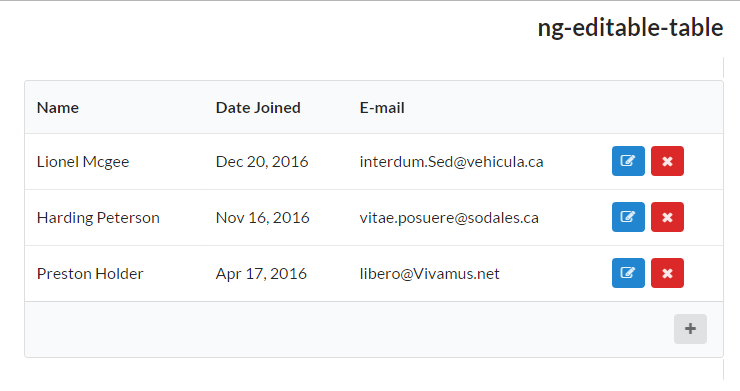
Normal view using Semantic-ui styles
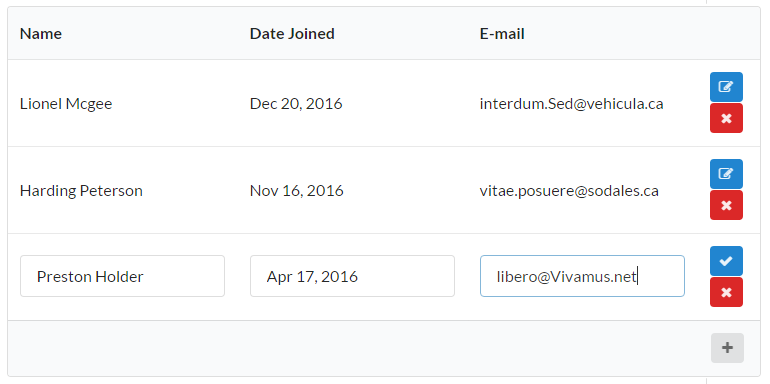
Editing view using Semantic-ui styles
Advance Example
If you need more control in the structure of the table, you can use the EditableTableService and implement your custom table like this.
Component
import { Component, OnInit } from '@angular/core';
import { EditableTableService } from 'ng-editable-table/editable-table/editable-table.service';

@Component({
  selector: 'app',
  templateUrl: './app.component.html',
  styleUrls: ['./app.component.css']
})
export class AppComponent implements OnInit {

  tableHeaders = ['Header 1', 'Header 2', 'Header 3'];

  tableRowsWithId = [
    [1, 'Example', 'Example', true]
  ];
  dataType = ['string', 'string', 'boolean'];

  constructor(private service: EditableTableService) {
  }

  ngOnInit() {
    this.service.createTableWithIds(this.tableHeaders, this.tableRowsWithId, this.dataType);
  }

  ...
}
View (HTML)
<h1>Advance example</h1>
<table>
      <thead>
            <tr>
                  <th *ngFor="let title of service.tableHeadersObjects">{{title.content}}</th>
                  <th></th>
            </tr>
      </thead>
      <tbody>
            <tr *ngFor="let row of service.tableRowsObjects">
                  <td *ngFor="let cell of row.cells">
                        <span *ngIf="service.isEditing.indexOf(row) === -1 && service.checkTypeOf(cell.content) !== 'boolean'">{{cell.content}}</span>
                        <span *ngIf="service.isEditing.indexOf(row) === -1 && service.checkTypeOf(cell.content) == 'boolean'">
                      {{cell.content ? 'Activo' : 'Inactivo'}}
                    </span>
                        <div class="ui input" *ngIf="!(service.isEditing.indexOf(row) == -1) && service.checkTypeOf(cell.content) !== 'boolean'">
                              <input type="text" [(ngModel)]="cell.content" [name]="cell.content">
                        </div>
                        <div *ngIf="!(service.isEditing.indexOf(row) == -1) && service.checkTypeOf(cell.content) === 'boolean'" class="field checkboxContainer">
                              <div class="ui toggle checkbox">
                                    <input type="checkbox" name="public" [(ngModel)]="cell.content" name="active">
                                    <label>{{cell.content ? 'Activo' : 'Inactivo'}}</label>
                              </div>
                        </div>
                  </td>
                  <td>
                        <button *ngIf="service.isEditing.indexOf(row) === -1 " (click)="service.editRow(row)">
                      <i class="fa fa-pencil-square-o"></i>
                    </button>
                        <button *ngIf="!(service.isEditing.indexOf(row) == -1)" (click)="service.saveRow(row)">
                      <i class="fa fa-check"></i>
                    </button>
                        <button *ngIf="service.isEditing.indexOf(row) === -1" (click)="service.deleteRow(row)">
                      <i class="fa fa-times"></i>
                    </button>
                        <button *ngIf="!(service.isEditing.indexOf(row) == -1) " (click)="service.cancelEdition(row)">
                      <i class="fa fa-times"></i>
                    </button>
                  </td>
            </tr>
      </tbody>
      <tfoot>
            <tr>
                  <th *ngFor="let title of service.tableHeadersObjects"></th>
                  <th>
                        <button (click)="service.addRow()">
                          <i class="fa fa-plus"></i>
                      </button>
                  </th>
            </tr>
      </tfoot>
</table>
 BennyFranco