

 Baseflow
Permission.storage.request() returns permanentlyDenied when it's allowed on android 13
🐛 Bug Report
This used to work until recently but I think it stopped exactly as I upgraded to android 13.
Expected behavior
return allowed
Reproduction steps
run Permission.storage.request();
Configuration
I have the below 2 lines in AndroidManifest:
<uses-permission android:name="android.permission.READ_EXTERNAL_STORAGE" />
<uses-permission android:name="android.permission.WRITE_EXTERNAL_STORAGE" />
Version: Flutter: 3.0.5 permission_handler: 10.0.0 android 13
Platform:
- [ ] :iphone: iOS
- [X] :robot: Android

With Android 13 you need to ask for granular permissions. This packages does not handle the new permissions currently

I am facing the same error. I see that this GitHub repo is not very active now..
Does permission_handler have plan to support Granular Media permissions (https://developer.android.com/about/versions/13/behavior-changes-13#granular-media-permissions) of Android 13 ? @mvanbeusekom Thanks.

Same error for me.
When the compile sdk & target sdk both set to 33 it's not working but I'm using firebase messaging which needs it.

I see there is already a PR for this. https://github.com/Baseflow/flutter-permission-handler/pull/870

A temp workaround is to downgrade your targetSdkVersion to 32, while keeping compileSdkVersion on 33 to cater for firebase requirements.

I see there is already a PR for this. #870
This PR was closed, so there is no support for the new granular permissions with this package.
I think this problem is a more broad issue. Our app crashes on Android 13 devices for every single permission requested. Do any of you know any umbrella issue where we can track android api 33 related problems?


I bumped package version to 10.2.0, added permissions to manifest file and for target SDK 33 Permission.storage.request() is still returning permanentlyDenied. (Also tried flutter clean & clearing cache).
I created a fresh project and there everything works as expected.

Hi @piotruela,
Did you also update the compileSdkVersion in the build.gradle file? The path should be android/app/build.gradle


With Android 13 and above (SDK 33 and +), use Granular media permissions. https://developer.android.com/about/versions/13/behavior-changes-13#granular-media-permissions
Conclusion:
- For Android 12 and before, use Permission.storage.request() for External Storage access
- For Android 13 and above, use following Granular media permissions:
- Permission.photos.request() : Read image files from external storage
- Permission.videos.request() : Read video files from external storage
- Permission.audio.request() : Read audio files from external storage
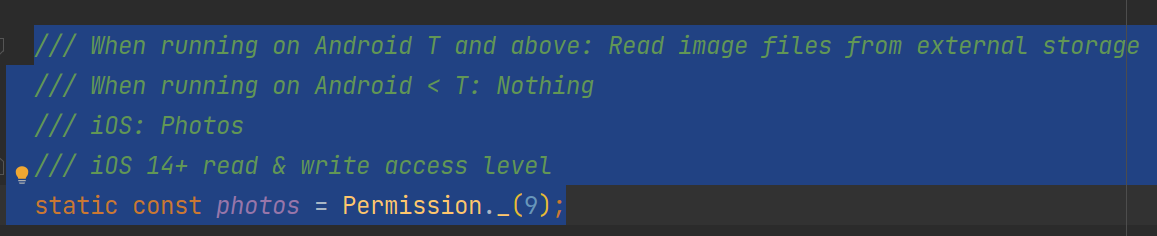

I have tested and OK.
I want to request permission to download PDFs from firebase, how do I do that?

This is how I've done it, accounting for Android 13 and below:
pubspec.yaml:
device_info_plus: ^8.0.0
clean and get dependencies to avoid crash
flutter clean
flutter pub get
AndroidManifest:
<uses-permission android:name="android.permission.READ_EXTERNAL_STORAGE" />
<uses-permission android:name="android.permission.WRITE_EXTERNAL_STORAGE" />
<uses-permission android:name="android.permission.READ_MEDIA_IMAGES"/>
<uses-permission android:name="android.permission.READ_MEDIA_VIDEO"/>
Wherever your code is:
bool storage = true;
bool videos = true;
bool photos = true;

// Only check for storage < Android 13
DeviceInfoPlugin deviceInfo = DeviceInfoPlugin();
AndroidDeviceInfo androidInfo = await deviceInfo.androidInfo;
if (androidInfo.version.sdkInt >= 33) {
  videos = await Permission.videos.status.isGranted;
  photos = await Permission.photos.status.isGranted;
} else {
  storage = await Permission.storage.status.isGranted;
}

if (storage && videos && photos) {
  // Good to go!
} else {
  // crap.
}

@daveshirman Thanks for sharing the code. I haven't tested it yet but if it works, should the Android version checking be somehow seamlessly baked in to the plugin instead of living in our code? Or at least it should be mentioned in the documentation.
@daveshirman Thanks for sharing the code. I haven't tested it yet but if it works, should the Android version checking be somehow seamlessly baked in to the plugin instead of living in our code? Or at least it should be mentioned in the documentation.
I wrapped the code in a platform check, e.g.
// Check for relevant permissions.
if (Platform.isIOS) {
  bool storage = await Permission.storage.status.isGranted;
  if (storage) {
    // Awesome
  } else {
    // Crap
  }
} else {
  bool storage = true;
  bool videos = true;
  bool photos = true;

  // Only check for storage < Android 13
  DeviceInfoPlugin deviceInfo = DeviceInfoPlugin();
  AndroidDeviceInfo androidInfo = await deviceInfo.androidInfo;
  if (androidInfo.version.sdkInt >= 33) {
    videos = await Permission.videos.status.isGranted;
    photos = await Permission.photos.status.isGranted;
  } else {
    storage = await Permission.storage.status.isGranted;
  }

  if (storage && videos && photos) {
    // Awesome
  } else {
    // Crap
  }
}
Any updates on this? Affecting several production users.
Only targeting 32 worked for me. Checking "permission.photos" returns true, but when used in FilePicker package, returns an error.


hi i got the solution which is working for me ,also using permission_handler: ^10.2.0.
change targetSdkVersion 31 in build.gradle
As SdkVersion 33 is for android 13 , changing it to 31 (android 12) .
so, may be it changing to 31 works as backward compatibility.
` defaultConfig {
    applicationId "com.example.example"
    minSdkVersion 28
    targetSdkVersion 31
    versionCode flutterVersionCode.toInteger()
    versionName flutterVersionName
    multiDexEnabled true
}`
for permission ` var status = await Permission.storage.status; debugPrint("storage permission " + status.toString()); if (await Permission.storage.isDenied) {
  debugPrint("sorage permission ===" + status.toString());

  await Permission.storage.request();
} else {
  debugPrint("permission storage " + status.toString());
 // do something with storage like file picker
}`

Some package limits READ_EXTERNAL_STORAGE permission until sdk 29 only, to make sure permission are set in manifest for sdk 30,31 and 32, you could try :
<uses-permission android:name="android.permission.READ_EXTERNAL_STORAGE" tools:replace="android:maxSdkVersion" android:maxSdkVersion="32"/>

This is a duplicate of #955. As mentioned there, there are changes to Android in 13, where requesting storage should be done using the granular media permissions. For more information, you can have a look here: https://developer.android.com/about/versions/13/behavior-changes-13#granular-media-permissions.

hi iam facing this error still can anyone help me out
Future
  if (Platform.isAndroid) {
    if (_getAndroidSdkVersion() >= 33) {
      // For Android 13 and above, use granular media permissions
      PermissionStatus photosStatus = await Permission.photos.request();
      PermissionStatus storageStatus = await Permission.storage.request();

      if (photosStatus.isGranted && storageStatus.isGranted) {
        storagePermissionGranted = true;
      } else if (photosStatus.isDenied || storageStatus.isDenied) {
        // The user denied permission, show a request dialog
        storagePermissionGranted = false;
        await openAppSettings();
      } else {
        // Handle permission denied
        storagePermissionGranted = false;
      }
    } else {
      // For Android 12 and below, use the old storage permission
      storagePermissionGranted = await Permission.storage.request().isGranted;
    }
  }

  if (storagePermissionGranted) {
    final response = await http.get(Uri.parse(url));

    if (response.statusCode == 200) {
      final directory = await getApplicationDocumentsDirectory();
      final filename = 'quotation.pdf';
      final filePath = '${directory.path}/$filename';

      final file = File(filePath);
      await file.writeAsBytes(response.bodyBytes);

      // Open the downloaded PDF file
      OpenFile.open(file.path);
    } else {
      // Handle HTTP error
      print('HTTP Error: ${response.statusCode}');
    }
  } else {
    // Handle storage permission denied
    print('Storage Permission Denied');
    // You can show a dialog or toast to inform the user about the permission denial
  }
} catch (e, stackTrace) {
  // Handle general exceptions
  print('Error during download: $e');
  print('StackTrace: $stackTrace');
}
}
defaultConfig { // TODO: Specify your own unique Application ID (https://developer.android.com/studio/build/application-id.html). applicationId "com.example.safestorage_supervisour" // You can update the following values to match your application needs. // For more information, see: https://docs.flutter.dev/deployment/android#reviewing-the-gradle-build-configuration. minSdkVersion 21 targetSdkVersion flutter.targetSdkVersion versionCode flutterVersionCode.toInteger() versionName flutterVersionName }

ReceivePort _port = ReceivePort();
@override void initState() { super.initState();
IsolateNameServer.registerPortWithName(
  _port.sendPort,
  'downloader_send_port',
);
_port.listen((dynamic data) {
  String id = data[0];
  DownloadTaskStatus status = data[1];
  int progress = data[2];

  if (status == DownloadTaskStatus.complete) {
    print('download completed');
  }
});

FlutterDownloader.registerCallback(downloadCallback);
}
Future
  if (status == DownloadTaskStatus.complete) {
    print('download completed');
  }
});

FlutterDownloader.registerCallback(downloadCallback);
}
@override void dispose() { IsolateNameServer.removePortNameMapping('downloader_send_port'); super.dispose(); }
@pragma('vm:entry-point') static void downloadCallback(String id, int status, int progress) { final SendPort? send = IsolateNameServer.lookupPortByName('downloader_send_port'); send!.send([id, status, progress]); }
String getFileNameFromUrl(String url) { List<String> segments = url.split('/'); String lastSegment = segments.last;
if (lastSegment.contains('?')) {
  return lastSegment.substring(0, lastSegment.indexOf('?'));
}
return lastSegment;
}
void downLoadNetworkFile(String url) async { final fileName = getFileNameFromUrl(url);
// final status = await Permission.storage.request();
bool storageGranted = await _requestPermission(Permission.storage);

if (storageGranted) {
  final id = await FlutterDownloader.enqueue(
    fileName: fileName,
    url: url,
    savedDir: '/storage/emulated/0/Download',
    showNotification: true,
    openFileFromNotification: true,
  );
} else {
  print('Permission Denied');
}
}
Future
check this for file download ,
