
azure-sdk-for-python
 azure-sdk-for-python copied to clipboard
 Azure
Azure
BlobClient throws Exception when setting a blob's legal_status
- Package Name: azure-storage-blob
- Package Version: 12.14.1
- Operating System: Linux
- Python Version: 3.11
Describe the bug azure.storage.blob.BlobClient is not able to set the legal_status for a freshly uploaded blob to True.
To Reproduce Steps to reproduce the behavior:
- Create file demo.txt with contents "Hello World"
- Copy/paste below code, insert storage account access credentials, execute:
import os
from azure.storage.blob import BlobServiceClient

service = BlobServiceClient(
    account_url="https://{}.blob.core.windows.net".format('<ACCOUNT_NAME_HERE>'),
    credential="<CREDENTIAL_HERE>"
)

container = service.get_container_client("test123")
if not container.exists():
    resp = container.create_container()
    print(resp)

file_len = os.path.getsize("demo.txt")
with open("demo.txt", "rb") as fh:
    blob = container.upload_blob("demo_legal_hold.txt", fh, length=file_len, overwrite=True)

resp = blob.set_legal_hold(True)
print(resp)
Expected behavior Blob is uploaded, legal_hold is set to True.
Reality
Traceback (most recent call last):
  File "/tmp/blob.py", line 20, in <module>
    resp = blob.set_legal_hold(True)
           ^^^^^^^^^^^^^^^^^^^^^^^^^
  File "/usr/local/lib/python3.11/site-packages/azure/core/tracing/decorator.py", line 78, in wrapper_use_tracer
    return func(*args, **kwargs)
           ^^^^^^^^^^^^^^^^^^^^^
  File "/usr/local/lib/python3.11/site-packages/azure/storage/blob/_blob_client.py", line 1519, in set_legal_hold
    return self._client.blob.set_legal_hold(legal_hold, cls=return_response_headers, **kwargs)
           ^^^^^^^^^^^^^^^^^^^^^^^^^^^^^^^^^^^^^^^^^^^^^^^^^^^^^^^^^^^^^^^^^^^^^^^^^^^^^^^^^^^
  File "/usr/local/lib/python3.11/site-packages/azure/core/tracing/decorator.py", line 78, in wrapper_use_tracer
    return func(*args, **kwargs)
           ^^^^^^^^^^^^^^^^^^^^^
  File "/usr/local/lib/python3.11/site-packages/azure/storage/blob/_generated/operations/_blob_operations.py", line 2603, in set_legal_hold
    raise HttpResponseError(response=response, model=error)
azure.core.exceptions.HttpResponseError: Operation returned an invalid status 'Value for one of the query parameters specified in the request URI is invalid.'
Content: <?xml version="1.0" encoding="utf-8"?><Error><Code>InvalidQueryParameterValue</Code>
<Message>Value for one of the query parameters specified in the request URI is invalid.
RequestId:4ce7e1f8-001e-0047-2e84-159bdd000000</Message>
<QueryParameterName>comp</QueryParameterName>
<QueryParameterValue>legalhold</QueryParameterValue>
<Reason /></Error>


Hi @daberlin Daniel, thanks for your inquiry. I am unable to reproduce these findings locally. Attached is a copy of your sample code (slightly modified to remove FileIO):
import os
from azure.storage.blob import BlobServiceClient

service = BlobServiceClient(
    account_url="https://{}.blob.core.windows.net".format('<ACCOUNT_NAME_HERE>'),
    credential="<CREDENTIAL_HERE>"
)

container = service.get_container_client("test123")
if not container.exists():
    resp = container.create_container()
    print(resp)

data = 'Hello World'
blob = container.upload_blob("demo_legal_hold.txt", data, length=len(data), overwrite=True)

resp = blob.set_legal_hold(True)
print(resp)
My Output (note: 2 print(resp) due to already existing container):
python test_legal_hold_28029.py
{'etag': '"0x8DAE3BA9C2EE578"', 'last_modified': datetime.datetime(2022, 12, 22, 1, 19, 45, tzinfo=datetime.timezone.utc), 'client_request_id': 'bbbd799a-8196-11ed-ab2a-4851c58829e3', 'request_id': 'b5d7d417-601e-004d-5aa3-1539cd000000', 'version': '2021-08-06', 'date': datetime.datetime(2022, 12, 22, 1, 19, 44, tzinfo=datetime.timezone.utc)}
{'client_request_id': 'bbd82759-8196-11ed-ba45-4851c58829e3', 'request_id': 'b5d7d434-601e-004d-6da3-1539cd000000', 'version': '2021-08-06', 'date': datetime.datetime(2022, 12, 22, 1, 19, 44, tzinfo=datetime.timezone.utc), 'legal_hold': True}
I see that you note in your original post that you observed this behavior with "freshly uploaded blobs". Does that mean for files that have already existed on your Storage account for some time, you don't run into this issue? I am trying to pinpoint if you can't set legal hold status at all or if this is possibly a network-related timing issue (i.e. the blob does not yet exist on our end).
Some suggestions that may resolve your issue:
- To remove the possibility of a network-related timing issue, try adding a sleep after uploading the blob
- Ensure that version-level immutability support is enabled on your account (legal hold requires both versioning and version-level immutability support to be enabled), more info found here
Hopefully that helps resolve your issue, but I am unafraid I am not seeing this reproduce locally on my end.
Thanks!

Found the problem: the storage account has sku_type Standard_LRS, which does not support immutability. Anyhow, I think this constellation should be caught by the SDK... AzureWhatEverError('Your account does not support immutability policies')
Hi @daberlin Daneil, I'm not terribly familiar with immutability policies but according to this documentation, immutability should be supported on all redundancy types, including LRS. Perhaps there was something else going on with your LRS account specifically.

I found this doc and to me it sounded, like the storage account mus be a Premium one...
https://learn.microsoft.com/en-us/azure/storage/blobs/immutable-storage-overview#supported-account-configurations
Hi @daberlin, the section you linked states that "Version-Level Legal Hold" (which I believe is what this operation is using) should be supported on "General-purpose v2" and "Premium Block Blob" accounts (these are two different things). Was your previous account standard V2 (that's the typical account type)? "Standard_LRS" only defines the tier and redundancy. Here is a look at the front page for a sample Storage account that I have.
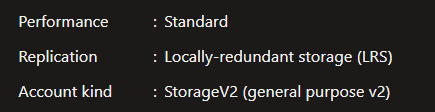
You're right - I created a second storage account that is (as much as possible) identical to my primary one, but has "Standard" performance instead of Premium. Still works.
So at the moment I'm not able to reproduce the problem - unfortunately, as it was 100% reproducible at first. From my side we can close this issue.