
azure-functions-java-worker
 azure-functions-java-worker copied to clipboard
 Azure
Azure
Node.js client call to Azure Functions Java requires Content-Length header set using 'https' package
When using a Node.js client app with the 'https' package, it requires the 'Content-Length' header to be set, otherwise the Azure Functions Java app will receive a 'null' body.
In contrast, using the same Node.js client and 'https' package to call a Azure Function written in dotnet/C# successfully receives the body without the 'Content-Length' header needing to be explicitly set on the client.
Repro steps
Provide the steps required to reproduce the problem:
- Create a simple Node.js app. (See code below)
- Use the 'https' npm package
- Make a post call to the Azure Function (Java) without the 'Content-Length' header set.
- The Azure Function (Java) receives a null body.
- If you explicitly set the Content-Length, Azure Function (Java) receives the body.
- Using the same Node.js app and calling to a Azure Function (C#) does not require the 'Content-Length' header set, and will successfully receive the body of the post request.
Expected behavior
Provide a description of the expected behavior.
- When posting to the Azure Function (Java) using 'https' npm package, the 'Content-Length' header should not need to be set, and the Azure Function should receive the body.
- This works as expected when calling Azure Function (C#), but does not work as expected when calling Azure Function (Java).
Actual behavior
Provide a description of the actual behavior observed.
-
When posting using 'https' npm package, to Azure Function (Java), the function receives a 'null' body if the 'Content-Length' header is not set.
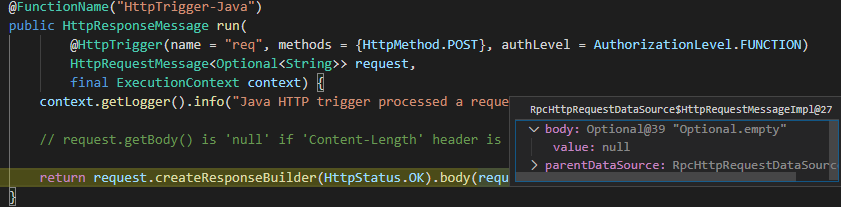
-
When posting using 'https' npm package, to Azure Function (C#), the function successfully receives the body if the 'Content-Length' header is not yet.
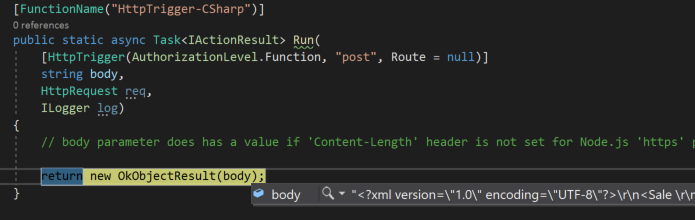
-
The behavior is inconsistent between Azure Functions (Java) and Azure Functions (C#)
Known workarounds
Provide a description of any known workarounds.
- Manually setting the 'Content-Length' header on the 'https' Node.js request being posted to the Azure Function (Java) allows the request to be received on the function.
- This is not required when calling the Azure Function (C#).
Sample Code
Node.js Client App
var https = require('https');

var xml = "<?xml version=\"1.0\" encoding=\"UTF-8\"?>\r\n<Sale \r\n</Sale>\r\n";

// Using 'https' Library:
var options = {
  host: '57c16559.ngrok.io',
  port: 443,
  path: '/api/HttpTrigger-Java',
  //path: '/api/HttpTrigger-CSharp',
  method: 'POST',
  headers: {
    'Content-Type': 'application/xml',
    // Azure Function (Java) requires 'Content-Length' set, otherwise it receives a 'null' body.
    // Azure Function (DotNet) doesn't require this, and successfully receives the body.
    //'Content-Length': xml.length
  }
};

var req = https.request(options, function(res) {
  console.log("statusCode: ", res.statusCode);
  console.log("headers: ", res.headers);
  res.on('data', function(d) {
    console.log(d);
  });
});

req.write(xml)
req.end()

req.on('error', function(e) {
  console.error(e);
});
Azure Function (Java)
@FunctionName("HttpTrigger-Java")
    public HttpResponseMessage run(
            @HttpTrigger(name = "req", methods = {HttpMethod.POST}, authLevel = AuthorizationLevel.FUNCTION)
            HttpRequestMessage<Optional<String>> request,
            final ExecutionContext context) {
        context.getLogger().info("Java HTTP trigger processed a request.");

        // request.getBody() is 'null' if 'Content-Length' header is not set for Node.js 'https' package.

        return request.createResponseBuilder(HttpStatus.OK).body(request.getBody()).build();
    }
Azure Function (C#)
[FunctionName("HttpTrigger-CSharp")]
        public static async Task<IActionResult> Run(
            [HttpTrigger(AuthorizationLevel.Function, "post", Route = null)]
            string body,
            HttpRequest req,
            ILogger log)
        {
            // body parameter does has a value if 'Content-Length' header is not set for Node.js 'https' package.

            return new OkObjectResult(body);
        }


I've been able to reproduce this. Results as follows for a JavaScript client:
| Server Language | Content Header? | Body Rec'd? |
|---|---|---|
| Java | N | N |
| Java | Y | Y |
| C# | N | Y |
| C# | Y | Y |
| JavaScript | N | Y |
| JavaScript | Y | Y |

