
acr
 acr copied to clipboard
 Azure
Azure
Issue with ACR Build with private endpoint and private registry.
Describe the bug When trying to execute an acr build task with a private repository and a private endpoint, the build task still tries to go through public internet.
To Reproduce Steps to reproduce the behavior:
- Create ACR with private Endpoint and Private registry
- Create a vm in the vm that could reach and use the private endpoint.
- try to execute an ACR build from the VM
Expected behavior The build will happen using the endpoint and pushing the image in ACR withouth passing through public internet.
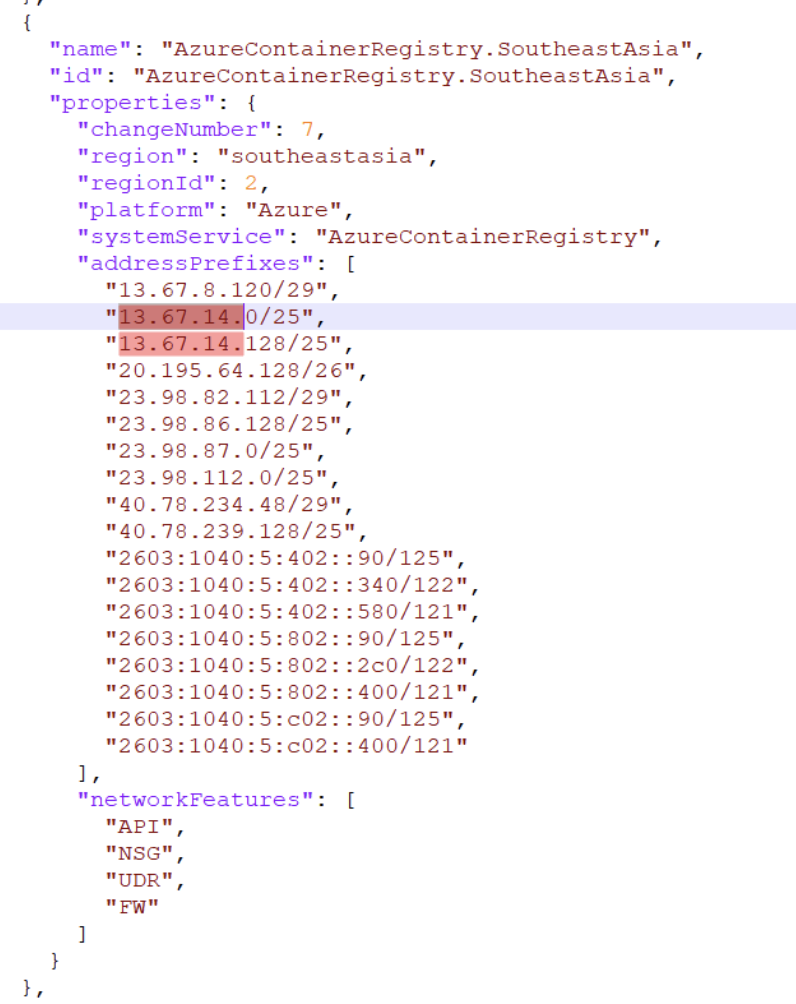
Screenshots error message similar to this one: denied: client with IP '<my public IP>' is not allowed access. Refer https://aka.ms/acr/firewall to grant access The IP seems to be one IP from Azure (probably the agent which is running the azure build). Enabling public access just from these CIDR ranges, works properly.
Any relevant environment information
- tried on Jumphost with Linux and latest version of az-cli 2.33
Additional context Seems similar to a problem that were there with acr login. https://github.com/Azure/azure-cli/issues/17137
If any information is a concern to post here, you can create a support ticket or send an email to [email protected].

@gianlucagravina In order for the az acr build command to connect to the ACR through private endpoint, you must use a dedicated agent pool. For more information on agent pool, please reference Run an ACR task on a dedicated agent pool. Per the documentation, an agent pool provides:
Virtual network support - Assign an agent pool to an Azure VNet, providing access to resources in the VNet such as a container registry, key vault, or storage.

Hi @jaysterp ,
thanks for the prompt reply.
As far as I understood az acr build is not in preview, but the agentpools are still in preview. Other than that the agentpools are not available in every region (not in Southeastasia for sure). Does it mean we just have to wait for the agentpool feature to be in GA and in southeastasia region? is there any public expected timeline for this feature ?
Hi @gianlucagravina. For customers using az acr build in regions where agent pool is not available, we recommend them to add the regional ACR IPs to the firewall rule. Please reference Allow access by IP address range.
Another option is to enable Trusted Services on your ACR. You can create an ACR task with a managed identity, which can access your network restricted ACR and execute the build. The az acr build command does not support trusted mode. For more information, please reference Allow trusted services to securely access a network-restricted container registry.
cc @northtyphoon for agent pool GA timeline.
Hi @jaysterp, thanks again.
The IP open is the solution we have right now, but we do really want to leverage a full private environment with NO publi access enabled, if possible, in the future.
I am looking at the acr task solution you mentioned, the whole process for the Managed Identity is quite clear to me, what is not clear is how to pass the context to the task executor. The quick task compress the source folder and sent it over the acr agent to build the docker image, I cannot see how we could leverage a similar solution, I have seen option for public git repo as well but no samples with gzip (and how to send the archive to the agent), or a private azure devops repository.
Hope you can share few directions on those point.
Thanks !
Hi @gianlucagravina,
The task resource supports fetching build contexts from private git repositories, including those hosted on Azure DevOps and GitHub. Please see this tutorial for more details Tutorial: Automate container image builds in the cloud when you commit source code.
You can also upload the local source folder to the ACR as an OCI artifact. The task can reference this artifact as the build context. For more information on this scenario, please see Example: Build Docker image from OCI artifact.
Closing as this has been inactive for over three months. Please reopen this issue if you would like additional guidance.

I'm using the approach to create an acr task with trusted services enabled.
# azure-pipelines.yml
...
cat acr-task.yml | az acr task create \
--name $(acrTaskName) \
--registry $(containerRegistryName) \
--resource-group $(resourceGroup) \
--assign-identity $(managedIdentityResourceId) \
--base-image-trigger-enabled true \
--commit-trigger-enabled false \
--context $(azdoRepoUrl) \
--file acr-task.yml \
--git-access-token $(azdoPat) \
--image $(imageRepository):$(tag) \
--auth-mode None \
--platform linux/amd64
...

# acr-task.yml
version: v1.1.0
env:
  - DOCKER_BUILDKIT=1
steps:
  - build: -t <registry/image:tag> -f Dockerfile .
  - push:
    - <registry/image:tag>
The build works fine, but it fails when its tries to push to the registry. See logs below from the acr task
WARNING: Waiting for an agent...
2023/09/26 11:49:11 Downloading source code...
2023/09/26 11:49:13 Finished downloading source code
2023/09/26 11:49:13 Alias support enabled for version >= 1.1.0, please see https://aka.ms/acr/tasks/task-aliases for more information.
2023/09/26 11:49:13 Creating Docker network: acb_default_network, driver: 'bridge'
2023/09/26 11:49:13 Successfully set up Docker network: acb_default_network
2023/09/26 11:49:13 Setting up Docker configuration...
2023/09/26 11:49:14 Successfully set up Docker configuration
2023/09/26 11:49:14 Executing step ID: acb_step_0. Timeout(sec): 10800, Working directory: '<working_dir>', Network: 'acb_default_network'
2023/09/26 11:49:14 Scanning for dependencies...
2023/09/26 11:49:14 Successfully scanned dependencies
2023/09/26 11:49:14 Launching container with name: acb_step_0
#1 [internal] load build definition from Dockerfile

... a lot logs from the image build step ...

2023/09/26 13:22:59 Successfully executed container: acb_step_0
2023/09/26 13:22:59 Executing step ID: acb_step_1. Timeout(sec): 10800, Working directory: '<working_dir>', Network: 'acb_default_network'
2023/09/26 13:22:59 Pushing image: <repository/image:tag>, attempt 1
The push refers to repository [<repository/image>]
9625a44d817e: Preparing
12b80ce8e4d4: Preparing
c9c71d64e29c: Preparing
2babfad71204: Preparing
ea76b589a19b: Preparing
c8d5d0488371: Preparing
d84b3f735b38: Preparing
6ddb118de38c: Preparing
71921e5152e9: Preparing
41fd64ac7c69: Preparing
13ec0e6f18a5: Preparing
3f62ab2ab751: Preparing
4354056cd29d: Preparing
b7a854ff9046: Preparing
a0c62babe17b: Preparing
397e594f381f: Preparing
dc0585a4b8b7: Preparing
13ec0e6f18a5: Waiting
3f62ab2ab751: Waiting
4354056cd29d: Waiting
b7a854ff9046: Waiting
a0c62babe17b: Waiting
397e594f381f: Waiting
dc0585a4b8b7: Waiting
d84b3f735b38: Waiting
6ddb118de38c: Waiting
71921e5152e9: Waiting
41fd64ac7c69: Waiting
c8d5d0488371: Waiting
denied: client with IP '20.50.200.20' is not allowed access. Refer https://aka.ms/acr/firewall to grant access.
failed to run step ID: acb_step_1: failed to push images successfully
Any advice?


Same issue, I was able to make it work with dedicated agent pools or by enabling Public internet access; but as soon as I disable public access, I get the error "client with IP 'xxxx' is not allowed access" when pushing the image

@arnaud-tincelin with dedicated agent pool it's working for us now ! it was related to dns record issue in our case
@arnaud-tincelin with dedicated agent pool it's working for us now ! it was related to dns record issue in our case
Hello how it was resolved via dns zone.. Could you please give some clarification

@gcpvasu , create a dedicated agent pool in a dedicated subnet. Be sure that the subnet can resolve your acr internally (private endpoint), check if you created a virtual network link between private.azurecr.io and the vnet of the dedicated agent pool subnet.