
acr
 acr copied to clipboard
 Azure
Azure
image pull failed since Inspect image returned null
Describe the bug
I am following the tuto at
https://github.com/microsoft/TailwindTraders/tree/master/Documents/DemoScripts/Integrating%20Azure%20DevOps%2C%20Microsoft%20Teams%20and%20GitHub
Chapter, "Configuring the Azure Continuous Delivery Pipeline"
After successful build, then successful release, I click on the "App Service Application URL" in the outcome, I land on an error page (info with Screenshots)

Whereas Release build was succeful

Going to diagnostics I have
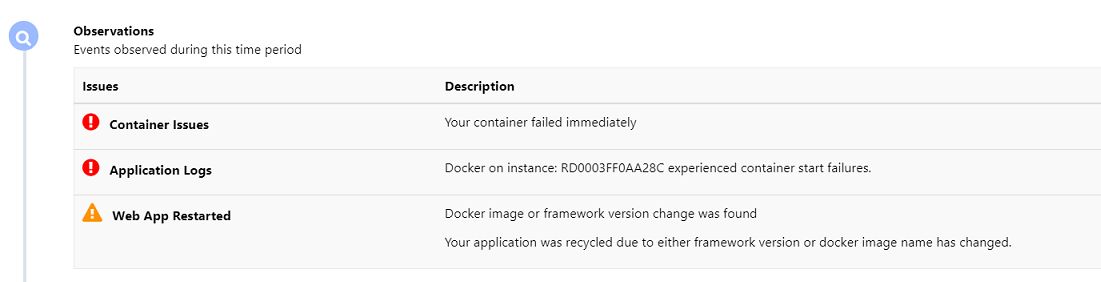
Clicking on more gives

Clicking the 2nd "more", I see

So what is missing the app service service principal has owner privileges on both container registry and app service
Any relevant environment information
- Azure CLI on Ubuntu provided by azure
- Docker version (provided by azure)
- 2020-05-23 14:23 (UTC)
- Registry = sierac.azurecr.io
- Image = tt-sieracwebsite:7

@eliassal , the error calls out an authentication error, I suggest cross check whether the credential was configured correctly. If service principal is used, you can use docker login sierac.azurecr.io -u <sp-id> -p <sp-secret>

HI, I did use the service principal but not sure if I am logged or not and what I can do!!! On the command line I get 2 (greater than signs) whatever I write I get nothing. When I created the SP, the outcome was
{
"appId": "5ebfbf98-...........................................c95d",
"displayName": "TTapp",
"name": "http://TTapp",
"password": "eNyNIQ..............................jV"Ws:Vo|",
"tenant": "6799c70...............................-8f6c565fd4a5"
}
so in the login command I use "appId" as the user and "password" for the password, is this correct? Also please note that in the release pipeline I can'y define a password variable as there is a "SLASH" in the password *V*

OK, I did not use the right credentials, I used the right ones and was able to log as follows

and was able to issue the command

However, In azure pipeline, I used the same credentials
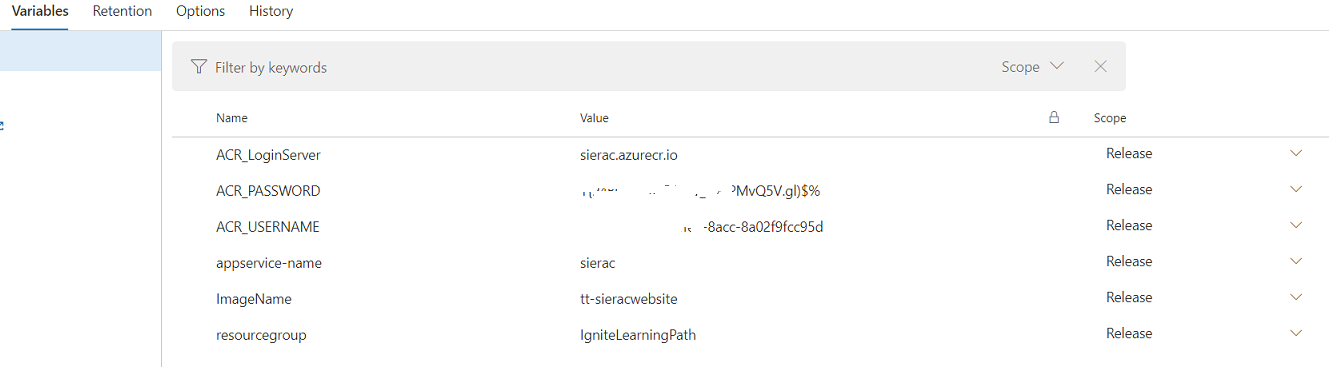
but the build of the release fails right away with
2020-05-25T15:16:02.5518205Z [command]/usr/bin/az account set --subscription aaaae3f-4725-460d-8e3b-82512dfda843 2020-05-25T15:16:03.4917855Z [command]/usr/bin/pwsh -NoLogo -NoProfile -NonInteractive -ExecutionPolicy Unrestricted -Command . '/home/vsts/work/_temp/azureclitaskscript1590419757221.ps1' 2020-05-25T15:16:08.2271716Z At /home/vsts/work/_temp/azureclitaskscript1590419757219_inlinescript.ps1:1 char:149 2020-05-25T15:16:08.2273483Z + … erac.azurecr.io -u *** -p Y{94BOZ8i3 … 2020-05-25T15:16:08.2273997Z + ~ 2020-05-25T15:16:08.2274684Z Missing closing '}' in statement block or type definition. 2020-05-25T15:16:08.2275203Z At /home/vsts/work/_temp/azureclitaskscript1590419757219_inlinescript.ps1:1 char:177 2020-05-25T15:16:08.2276412Z + … fbf98-e6c8-4fe0-8acc-8a02f9fcc95d -p *** 2020-05-25T15:16:08.2277297Z + ~ 2020-05-25T15:16:08.2278154Z Unexpected token ')' in expression or statement. 2020-05-25T15:16:08.2278659Z + CategoryInfo : ParserError: (:) [], ParentContainsErrorRecordException 2020-05-25T15:16:08.2279114Z + FullyQualifiedErrorId : MissingEndCurlyBrace 2020-05-25T15:16:08.2475171Z ##[error]Script failed with exit code: 1 2020-05-25T15:16:08.2515799Z [command]/usr/bin/az account clear 2020-05-25T15:16:09.1360808Z ##[section]Finishing: Configure Container settings to App Service
When I check my resources on azure portal I can see the SIERAC container as well as
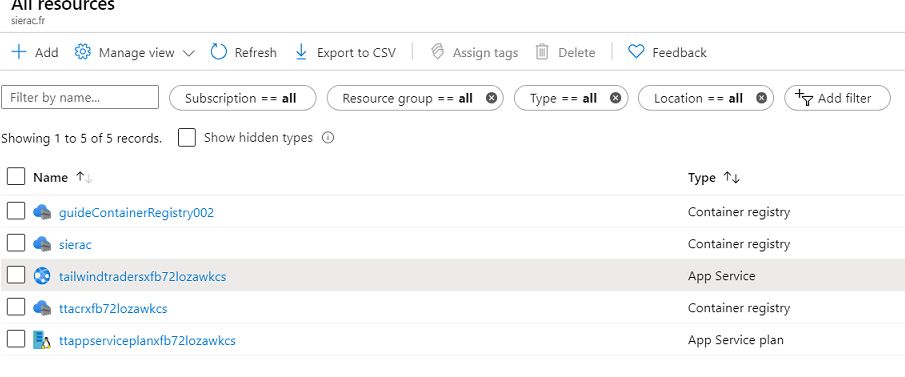
Can you please tell me what values should go in the boxes
- ACR_PASSWORD
- ACR_USERNAME
- appservice-name
I am completely lost, thanks for your help
Closing as this has been inactive for over three months. Please open a support ticket with our team for assistance.

@terencet-dev, yes b ecause I am waiting for feedback from your team since May 25/2020

@eliassal I had a similar issue. Basically the issue for me boiled down to having different configurations in the pipeline and in the release.
I eventually noticed that my variables in my pipeline was not the same as in the release. The pipeline build process pushed ...-web-release meanwhile what I had in release was ...-web-prod. So check your release settings and make sure the variables as well as the image name is same as specified in the pipeline.
To change this, I went to pipelines -> edit -> variables, make sure your variable names are correct, then cross-check that your image name in build/push an image is setup properly to get the right environment name.
Go to release -> edit -> variables, make sure your variable names are the same as in the pipeline. On that same page, go to Azure App Service Deploy(I'm assuming you already have this created). Make sure the image is the same name/structure as the image name from the pipeline. Also make sure your app service name is structured properly.
To see if you're on the right track,
Build your pipeline,
Check your build process for Push an Image,
Check the line immediately before The push refers to ... , you should have your image name at the end of it. Something like this /...-web-release: 12345.
Compare everything after the / and before the : . From my example, that would be /...-web-release. Make sure this is the same as you have in the image field in your release settings.
I'm not the best at explaining but I hope this helps.

@eliassal did you find the solution for the issue, Currently i am facing the same issue.

Well, I reworked the whole exercise from the beginning. I started by recreatint the RBAC with privileges on Subscription level as follows
az ad sp create-for-rbac --name TTappSierac --role Contributor --scopes /subscriptions/XXXXXXXX-YY-640K-8e3b-DSFRDda765
Build pipeline worked fine but release pipeline started erroring in the "AZ CLI " step as follows
2024-02-03T18:07:19.9265477Z [31;1m[31;1m+ call az webapp config container set -n tailwindtradersdwcvvbremzkno - …[0m 2024-02-03T18:07:19.9265990Z [31;1m[31;1m+ ~~~~[0m 2024-02-03T18:07:19.9266518Z [31;1m[31;1m+ CategoryInfo : ObjectNotFound: (call:String) [], ParentContainsErrorRecordException[0m 2024-02-03T18:07:19.9268054Z [31;1m[31;1m+ FullyQualifiedErrorId : CommandNotFoundException[0m 2024-02-03T18:07:20.0335521Z ##[debug]Exit code 1 received from tool 'C:\Program Files\PowerShell\7\pwsh.exe' 2024-02-03T18:07:20.0338279Z ##[debug]STDIO streams have closed for tool 'C:\Program Files\PowerShell\7\pwsh.exe' 2024-02-03T18:07:20.0354288Z ##[debug]task result: Failed 2024-02-03T18:07:20.0387876Z ##[error]Script failed with exit code: 1
After thinking, I executed the command on the commandline and it worked fine so I understood it was because the word "CALL"
az webapp config container set -n $(appservice-name) -g $(resourcegroup) -c website -r $(ACR_LoginServer) -u $(ACR_USERNAME) -p $(ACR_PASSWORD)
I removed "CALL" from the step Az CLI in the release pipelinne, triggered a build and everything went through and I was able to access the web site.
@yugangw-msft , OK, I needed to create the RBAC on Subscription level, which I think from "Least Privilege" concept is not a good practice. How can we limit the creation ofr RBAC with only necessary privileges to make this scenario works and not grant him this wide privileges? Thanks