
AppFlowy
 AppFlowy copied to clipboard
 AppFlowy-IO
[Bug] korean letters were all broken.
Bug Description
When typing in Korean, I noticed that the letters were all broken. It looks like every letter is typed multiple times.
How to Reproduce
Install the latest version of appflowy for windows
Expected Behavior
The letters must be entered correctly. This is not an issue with the Flutter SDK itself, as other Flutter apps display Korean correctly as shown in the screenshot below.
Operating System
Windows 10
AppFlowy Version(s)
0.2.4
Screenshots
Additional Context
No response

The same. also have trouble in typing Chinese and Japanese (Microsoft IME).


Actually, it's a Flutter issue related to DeltaTextInputClient. We replaced it with TextInputClient and implemented text diff ourselves.
https://github.com/AppFlowy-IO/AppFlowy/assets/11863087/125a1ba6-a8cc-484a-b22c-ddf284227ff4
@letyletylety Is the event shown in the video correct?

In the video, it seems to work fine. Can you try typing a series of keys without hitting the space key in between? Or could you let me know how I can test it myself?
Thanks for your quick feedback.
Sure, @letyletylety. The easiest way is to test it directly in the editor.
- checkout this repo https://github.com/AppFlowy-IO/appflowy-editor with main branch.
- flutter pub get and flutter run.
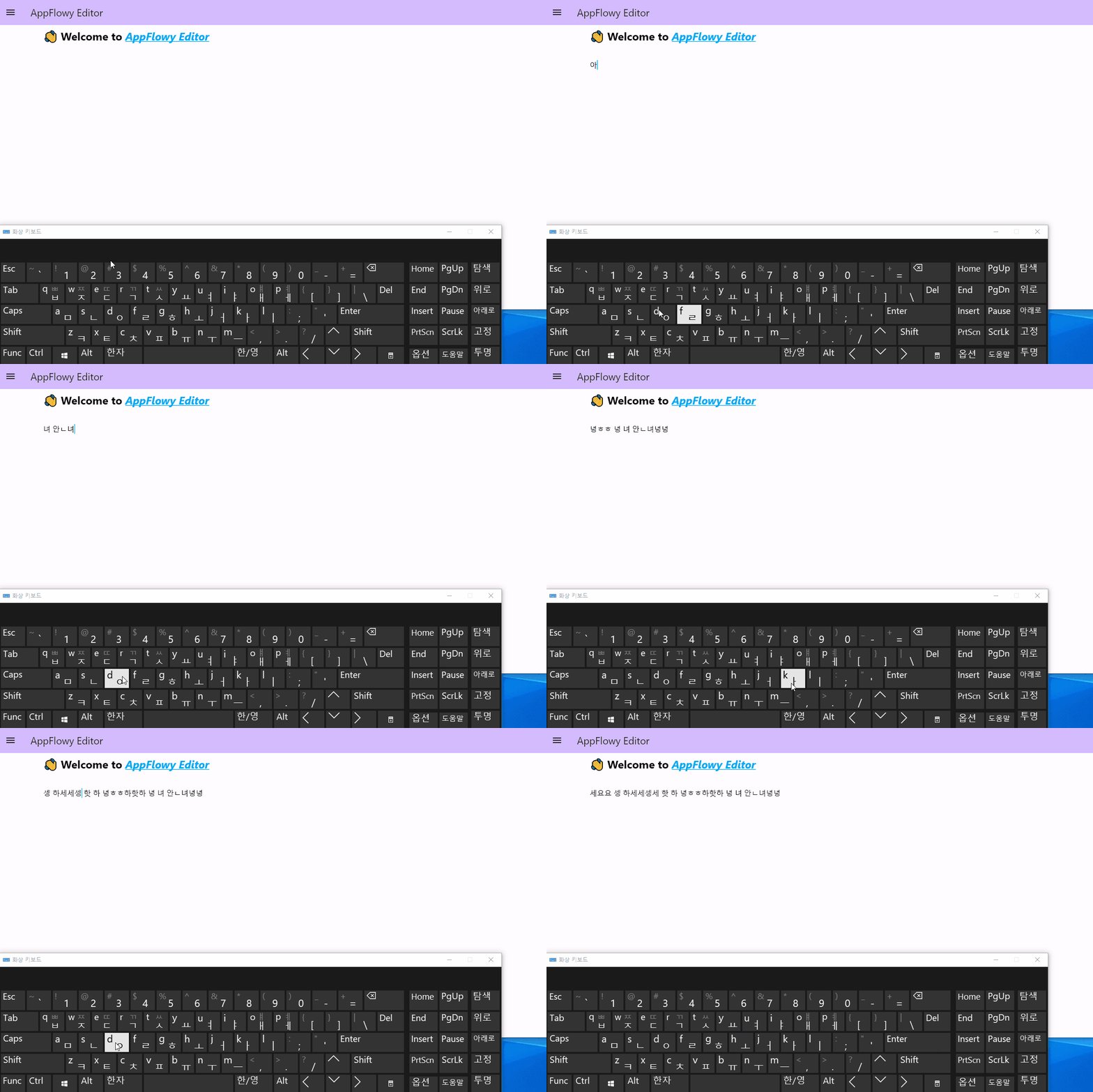
As you can see in the gif above, it's still not working properly. The behavior has changed, but it still seems unusable.
https://github.com/AppFlowy-IO/AppFlowy/issues/2896#issuecomment-1609655775
In the test in this comment, if you kept typing without hitting the space key midway through, you would see the similar result.
Um...I just forked the repo and tested it. (https://github.com/letyletylety/appflowy-editor) I tested it in release mode. I used a virtual keyboard for the recording, but I got the same results using a physical keyboard.
Is this issue resolved in 0.3.1? Nothing has changed at all compared to when I last posted the issue.
@letyletylety I tested it on my Windows, just as shown in the video. Have you reproduced it in the latest version?
https://www.loom.com/share/60449cc32e1d4897a2b7e2f6e68e62b1
@letyletylety By the way, did you use the built-in Korean IME from Microsoft? I just checked with the built-in one again, and it works well from my side.
https://www.loom.com/share/dc82d11358144973a1db511fad404b90
@LucasXu0
I just use built-in one.
The same issue occurs on both my home PC and my work PC. Both use windows10.
In my side, nothing has changed from https://github.com/AppFlowy-IO/AppFlowy/issues/2896#issuecomment-1611640324
I wonder if this has been resolved for other CJK users in v0.3.1
As I said at the beginning, Korean characters are being input normally in other Flutter apps (probably using the default TextField Widget).

thank you
I'm using built-in Korean IME from Microsoft, window10, appFlowy v0.4.1
I tried to type "안녕하세요" which means "hello" It can be written by typing following characters "ㅇㅏㄴㄴㅕㅇㅎㅏㅅㅔㅇㅛ"
you can see the picture attached

@Aiden-ee , we would like to support CJK input methods well. @Aiden-ee , @daniel080400 , please specify your operating system, app version number, @Aiden-ee, + the input method.
@annieappflowy same issue happened with my system. OS: Debian 12 (bookworm) Input conf1: ibus, ibus-chewing Input conf2: fcitx5, fcitx5-chewing Appflowy ver: deb pck v0.4.8
Both ibus and fcitx5 represents the same issue
