

 AdguardTeam
Websites load slowly when using SOCKS in Firefox
after add socks5 in firefox and add no proxy for some sites, adguard had some stumbling problem those sites load with delay
Steps to reproduce
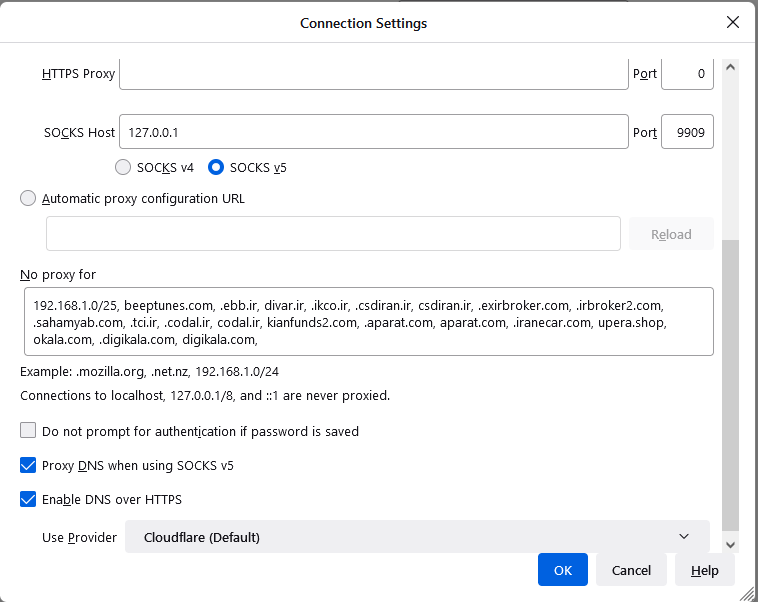
1.Go to Firefox settings about:preferences 2.Network Settings 3.Manual proxy configuration 4.Add SOCKS Host 5.No proxy for some sites that you don't want they Open through a proxy ( Bypass )
Expected behavior
sites should load fast as others urls
Actual behavior
page will be freeze and stuck for 7sec keep reloading local.adguard.org
Screenshot:
https://user-images.githubusercontent.com/13505498/169118090-7a451fad-5787-4838-adef-c5097adb530f.mp4
- Environment name and version: FireFox 100.0.1 (64-bit)
- Operating system and version: Edition Windows 10 Enterprise Version 21H1 Installed on 12/18/2020 OS build 19043.1706 Experience Windows Feature Experience Pack 120.2212.4170.0 Adguard 7.10 nightly 7 (build 3920, CL 1.9.68)

Hi! Sorry it took me so long to reply. Can't reproduce the problem on our side which means that we need to get your app logs. Here's what we need you to do:
- Collect the debug log as it's explained here.
- Remember the exact time when the issue was reproduced. We will need it to find the corresponding records in the log file.
- Send the archive to
[email protected]and mention this issue number in the subject(4260).

Also, could you check if this problem still persists on the latest nightly version?
Also, could you check if this problem still persists on the latest nightly version?
last ver has this problem too 7.10 nightly 12 (build 3941, CL 1.9.69) logs send it to your email
This issue has been automatically marked as stale because it has not had recent activity. It will be closed if no further activity occurs. Thank you for your contributions.
![stale[bot] avatar](https://avatars.githubusercontent.com/in/1724?v=4 "Published by a pub.dev verified publisher")
@khafan11 could you check again please with this nightly build? It's supposed to work well. If not, please grab the logs as I described here and send to us.
Hi @Aydinv13 it's not fixed , i sent debug log right now , but i should mention that i use Some Chinese vpn @geph that create local proxy ( 127.0.0.1:9909 For socks5 ) then i use it in my firefox socks5 setting maybe that's the reason ?
@Aydinv13 Unfortunately i can't , Socks5 is blocked in iran ,i cant connect socks5 directly
@khafan11 Finally, I reproduced the issue on my side with Geph VPN, so it will take some time to investigate why it happens.
@khafan11 Short explanation: you'll have to add local.adguard.org to the "no proxy" list. The proxy can't connect to it since it is a special "black hole" address.
Longer explanation:
Normally, we use local.adguard.org as the domain for injected content. It resolves to a special "black hole" address: all packets sent to it are always "lost". Therefore, any connection attempt will never succeed, and can only time out. All data transfer between this address and the browser is handled locally by AdGuard.
However, when we detect that the connection to a site is through a proxy, we switch to another domain, injections.adguard.org which is accessible, since the proxy must be able to connect to it.
In your case, you have excluded some sites from proxying, so we inject local.adguard.org into their pages. When the browser then tries to connect to local.adguard.org through a proxy, it fails after a timeout. The solution is described above.
