
AdguardForAndroid
 AdguardForAndroid copied to clipboard
 AdguardTeam
WiFi network specific DNS settings (AGH integration)
Problem Description
First posed in Forums here - https://forum.adguard.com/index.php?threads/adguard-home-detection-integration.34691/
All of my family's Android phones and tablets run AdGuard for Android (AGforA) and at home I also run AdGuard Home (AGH).
The problem I now have is that by using the DNS capability in AGforA to enforce use of secure DNS, when those same devices are connected to my home network, they do not use AGH.
The impact of this is that I can't use some of the cool new service blocking features of AGH of my children's devices in the house to control access without disabling the DNS control in AGforA. Flipside is that if I disable the DNS settings, when they are away from home and on public internet, Wifi Hotspots, friend's WiFi, then they are less secure.
This may also provide better DNS performance on the Android devices as they are using a local DNS server (i.e. AGH) on the local network that can also cache DNS requests, as opposed to sending every DNS request out to the configured external DNS server (e.g. Cloudflare).
Proposed Solution
I guess in effect we're looking for network specific DNS settings in the AGforA app so when it connects to your home WiFi (configured by user in settings) then it can be configured to use the DHCP allocated DNS server (i.e. AGH), but for any other network connection, it uses the AGforA configured DNS setting (if enabled).
Not sure if this even possible in Android, but if it is, this would be a great feature to add.
Alternatives Considered
Manually turning AGforA DNS settings on and off every time devices enter and leave the house.
Additional Information
I acknowledge that this shouldn't be seen as a strong security measure to use the service blocking while services are in the home as a user could just force the AGforA DNS setting to external DNS, or turn off WiFi on devices with cellular access, to bypass. However, for zero-tech level users it would suffice.
Security aside, the aforementioned potential performance improvements may also be a single benefit making this (if possible) worth doing.

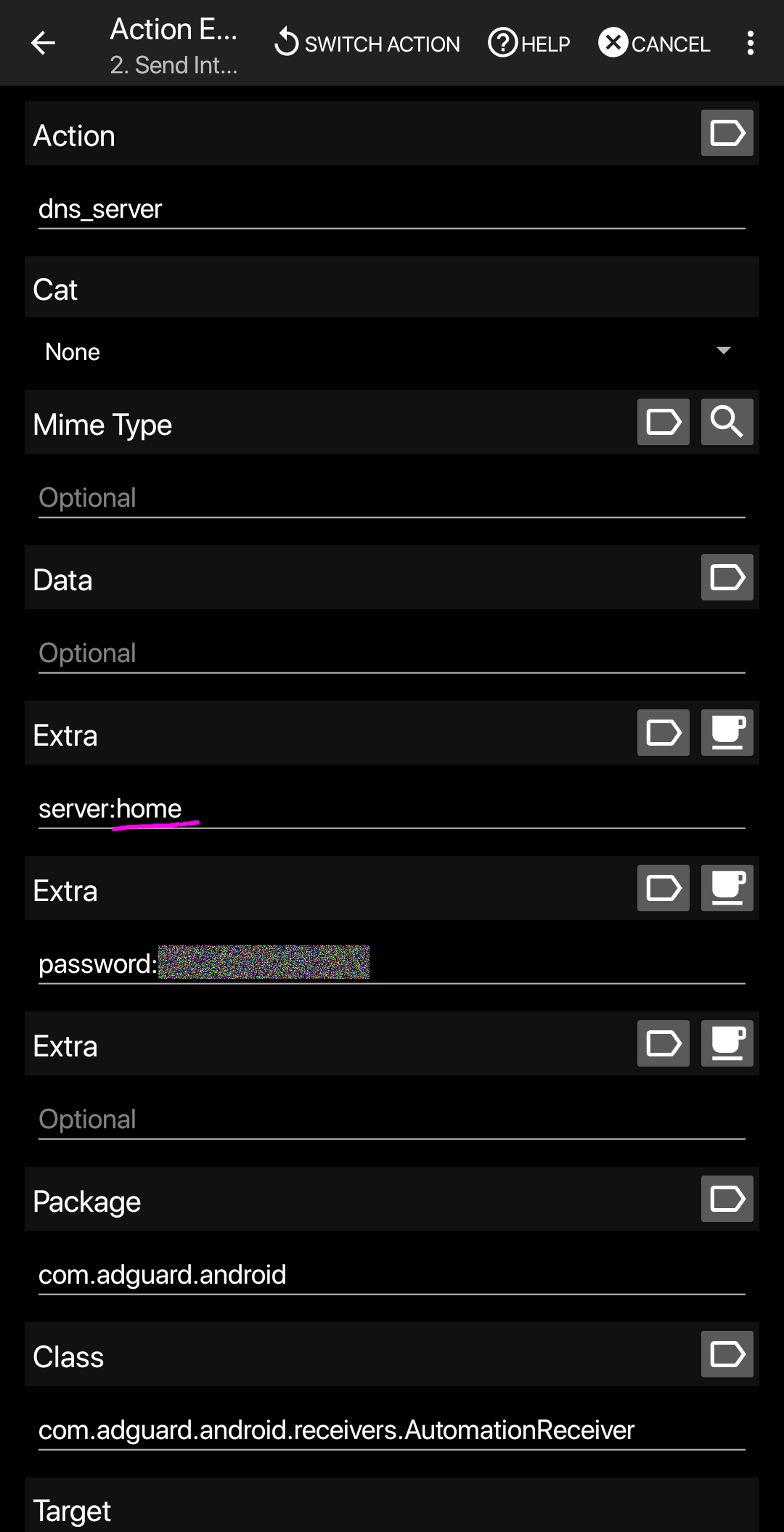
I have the same system configuration at home as you. My solution is to use "Automation" features. https://kb.adguard.com/en/android/solving-problems/tasker
I'm using Tasker app. Send intent to AdGuard as a trigger for connecting and disconnecting to home Wi-Fi. Tasker: https://play.google.com/store/apps/details?id=net.dinglisch.android.taskerm
As you say, it's nice to be able to do it only with AdGuard for Android.
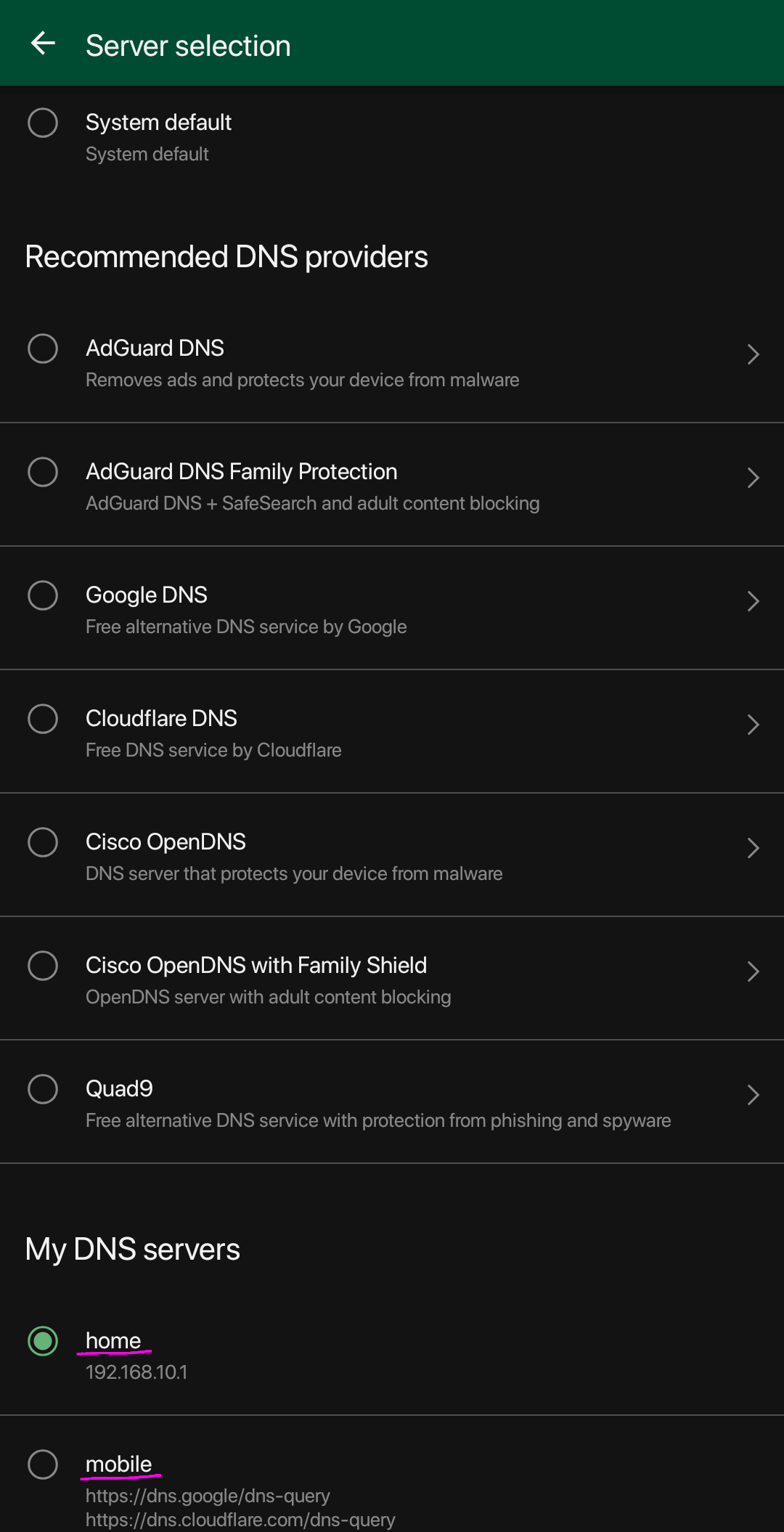
Screenshot ...
AdGuard - Settings > DNS Filtering > Select DNS server
Tasker - Task Edit > Sent Intent

Ahhhh! Thanks @gontazaka ! That's a really clever workaround for the problem!
I already use Automate and IFTTT for some basic automation. I'll take a look at Tasker. Thanks for sharing the details that work for you!
To the AG team - it would be nice to not have to use 3rd party tools for this. Then again, I can appreciate that the sort of people that will be running AGH in their home ARE the sort of people that would also be likely to be able to use Tasker, etc. and conversely, the opposite also applies.
We're going to do the same in AdGuard for iOS, and I guess it's logical to do it on Android as well.


@enr00ted no news yet, but please upvote this feature request if you want it to be done sooner.
We're choosing the most upvoted ones when decide what to implement.
Definitely should remember https://github.com/AdguardTeam/AdguardForAndroid/issues/4010 while implementing this.
