

 AdguardTeam
Hotkey interception in the filtering does not allow to use browser's search on the page
Issue Details
- AdGuard version: 4.1.1
- Browser and version: Chrome 103
- Operating system and version: Windows 10
- Filters you use in AdGuard: Base, 2x AdGuard tracking, Social, Annoyances, Russian
- Stealth Mode settings: All, except cookies
- Other browser extensions: no
Actual Behavior
Cannot use Ctrl-F to search a text on the filtering log page. We use it to search a specific text in the lines, that displayed by the search, and on details panel.
Expected Behavior
If possible, open browser's search by double Ctrl-F(or suggest another solution).

We can turn off this shortcut for the filtering log if users prefer to use native search.

:bulb: Alternative idea
Just pop up a small black or white (theme awareness) semi-transparent notification (custom toast notification … or native one if supported/enabled by the user) at bottom right for a few seconds after the user presses Ctrl+F to inform him like so: "Use F3 instead for native search."
Possibly display this notification only once per "session" (versus at each Ctrl+F).
F3 is OK at least on Firefox and Edge browsers on Windows 10.
However, should work for any Chromium/Firefox based browsers. Just make sure of that in many various situations though.

"Use
F3instead for native search."
It is obvious:) I just forgot about that.
We can turn off this shortcut for the filtering log
Ok.
:relaxed:
We can turn off this shortcut for the filtering log
Ok.
Personally, I find it convenient.
As an alternative, there are at least:
View possible alternatives (in no preferred order) … :eyes:
-
:zero: Alex's initial solution (i.e. "If possible, open browser's search by double Ctrl-F") — whether this means
Ctrl+FCtrl+ForCtrl+F+F; -
:one: My main solution¹ (i.e.
Ctrl+Fworks as currently but when pressed, the user is made aware immediately of the ~~F3~~Ctrl+G/Command-Galternative access to the native search via a toast notification — appearing only once maximum per "session", whether this means closing theFiltering logwindow or the entire browser required to show it again); -
:two: The use of
Ctrl+Shift+F² instead to trigger the AdGuard search, leavingCtrl+Funtouched; -
:three: Similar to
AdGuard for Windows³ ('smart/dynamic' solution): interceptCtrl+F(for main search field focusing) only if panel 'Request details' >Previewsection is not open (to let browser's native search possible for code search in thePreviewpart like so, if open); -
:four: As
AdGuard for Windows³ (advantage: same overall user experience therefore): interceptCtrl+F(for main search field focusing) only if panel 'Request details' >Previewsection is not open, else focus on a new search field⁴ to be added under the code part of thisPreviewsection — see screenshot for the idea; -
:five: … or just let the user choose (additional setting though): whether via "interception ON/OFF" (toggle) or varied free choice (drop-down list).
Footnotes
¹ See one of my posts below — the most edited one — for the problematic behavior of F3 (and Ctrl+G/Command-G too) under Firefox though. :slightly_frowning_face:
² User informed of this useful Ctrl+Shift+F keyboard shortcut via a tooltip when hovering over the "magnifying glass" icon. :mag:
³ "Similar to" (alternative 3) or "As" (alternative 4), though, small detail, currently on AG for Windows, an extra click in the code itself is required beforehand for code search via Ctrl+F (in this program that means to focus the bottom dedicated search field). So, just opening the adequate section (by clicking on the Preview tab there, equivalent to the Preview button in the extension) is not sufficient for that. Should not be the case IMHO but that's another minor problem which can be easily corrected later for inter-product consistency in this case. :thumbsup:
⁴ Ideally, if a new search field for code search is implemented, unlike current (and not ideal IMHO, except for possible performance reasons) AG for Windows behavior, it should be like the browser's native search here therefore: meaning … each character typed = search highlights updated. Enter key never needed, except to go to the next found result. :keyboard:
To vote (multiple voting possible):
:smile: for :zero: — :tada: for :one:
:confused: for :two: — :heart: for :three:
:rocket: for :four: — :eyes: for :five:
:thumbsdown: for … suppression of this Ctrl+F keyboard shortcut — in the Filtering log window — without any replacement.
Note: To facilitate the vote click, counter already initialized by default to one for each.
:thought_balloon: Regarding my main solution (technical aspects) …
Click to read …
Example found:
React Toast notification with react-hot-toast https://codepen.io/piyushpd139/pen/qBpjaMa
:one: <Toaster position="top-right" /> in JS (Babel) part is actually ideal. As … this is the position where the user expects to find his search field on Chromium-based browsers, except he will find an informative notification at this location instead, basically telling him during a few seconds to use F3 instead if native search desired — without preventing the current AdGuard search action so. Also, this position does not hide the log lines. But "bottom-right" remains a possibility as well.
:two: Possibly use the Emoji Icon version, but with a beautiful round informative icon instead (like that but in better: :information_source:).
:three: Possibly use a simple fade-in / fade-out effect instead.
To be displayed within the Filtering log window only when the user presses Ctrl+F.
But ideally, should not be displayed again until the next closing/opening of this window — or even, until the next closing/opening of the browser.
:x: UPD: My main solution, while "OK" on Edge (and probably on any Chromium-based browsers), is problematic on Firefox (regarding its F3 behavior).
Click to read the reason …
Reason: Because globally, if the user uses the native search (i.e. searches for a certain keyword for instance), closes the native search and tries to press F3 again later, this will trigger the search for the next occurrence (so the behavior of this key is not totally identical to Ctrl+F first) BUT … where Edge will redisplay the search field, Firefox will only highlight the next occurrence(s) without displaying the search field again while doing so (meaning … search field no longer displayable therefore …).
Click for an additional remark (upd: now fixed in v4.1.1 :tada:)
:warning: In any case, if we leave access to a native search via Ctrl+F (proper way like so), we will have to correct a more general problem currently visible with F3: Both ~Edge~¹ and ~Firefox~² have their search highlights removed after 1-2 sec. (probably related to a non-stop auto-refresh of logs by the extension, possibly easily fixable but …).
¹ Not reproducible anymore, probably/visibly due to the update to AdGuard Browser extension v4.1.1. :tada:
² Waiting for the availability of v4.1.1 in the store to confirm if fixed or not.
EDIT: Tested with the .zip and confirmed that it's fixed in this version in Firefox too! :tada: :tada:
:arrow_right_hook: Most likely the fix was related to this: [Fixed] The cursor is flashing when hovering over a row in the Filtering log table
@Alex-302 By the way …
Click to reveal …
Not important at all, but it should be noted that in the Expected Behavior part of your issue, your sentence If possible, open browser's search by double Ctrl-F(or suggest another solution). can be interpreted in two ways:
- or suggest another solution … to the user if he presses
Ctrl+Ftwice, like to useF3instead (in which case, my main suggestion is very similar to yours, except pressingCtrl+Fone time suffices for me to inform the user + I specify the method, i.e. via a toast notification — appearing only once maximum per "session"); - or suggest another solution … directed to the people / devs who read your issue — in the sense of "if you have any idea …" / "if you have a better idea …".
:arrow_right: I must say that I understood the second possibility. :relaxed:
@contribucious
- or suggest another solution … directed to the people / devs who read your issue
This)
:point_up_2: Update
I updated the list of possible alternatives.
Long, I grant you, but I hope much clearer for the team of developers as well. :thumbsup:
Think of it more as a blog post actually. :wink:
The public vote is now open! (Edit: For real now, voting system in place. :smile:) (@Alex-302 Any preference? :relaxed:)
Seems like F3 isn't working on macos.
cmd + f + f - not sure if extension can retransmite cmd-f shortcut to the native system
3, 4 - does the issue happens only when preview window is open?
I prefer cmd/ctrl + shift + f for focusing search field. This option looks valid for me.
Seems like
F3isn't working on macos.
So, one less option. I kinda suspected that when I saw this later — the isWindowsOs part — (taken from this commit).
:arrow_right: A variant could however be the opposite: Leave Ctrl+F natively and intercept F3 for AdGuard search (if this is not problematic on macOS either). But people may want a "next result" hotkey, therefore not an ideal choice. Another free F[1-12] key perhaps? (Often used by various apps globally on the system though. Not ideal either, consequently.)
I prefer
cmd/ctrl + shift + ffor focusing search field. This option looks valid for me.
I like this option too. One that came to me among the quickest by the way and quite naturally.
:bulb: Cmd+Shift+F (for macOS users) seems less easy than Ctrl+Shift+F though. Maybe Ctrl+Shift+F for all? (A bit less natural / macOS-style for them though.)
:eyes: Note that, in all cases, some users (both PC and MAC) have the FN key below SHIFT, instead of CTRL. Not my case but indeed, less practical then.
(Not directly related to the subject itself.)
3, 4 - does the issue happens only when preview window is open?
Not sure I fully understand but here is the problem in a nutshell (Steps to reproduce).
Reveal …
- Open
Filtering LogofAG for Windows; - Visit https://example.org;
- Click on the corresponding HTML entry in it;
- Click on the
Generaltab (default one though) and pressCtrl+F→ MAIN search field is focused as expected. :heavy_check_mark: - Click on the
Networktab and pressCtrl+F→ MAIN search field is focused as expected. :heavy_check_mark: - Click on the
Previewtab and pressCtrl+F→ MAIN search field is focused. CODE search field should be instead in my opinion. Like this, to reuse one of my screenshots. Without having to click in the code area (a.k.a. in the code itself) first. However, I understand the current logic (i.e. if behavior changed to my idea, how to easily access {hotkey} the main search field again if you stay in this tab from then on?)
:arrow_right: Anyway, if alternative :four: is implemented (i.e. a new code search field is added in the extension too), then ideally it should be standardized on both (app(s) and extension). Meaning … either clicking in the code area (a.k.a. in the code itself) required beforehand to search some code via Ctrl+F for all "products" or for none.
:arrow_right: And if alternative :three: is implemented (i.e. browser's native search allowed only in one place: the Preview section), since the browser's native search starts its search directly without worrying about having clicked in the code area (a.k.a. in the code itself) beforehand, we should logically do the same with AdGuard for Windows with its dedicated field (i.e. as soon as the code is physically visible to our eyes, we should be able to Ctrl+F and type our search). But as I said, I understand the current logic of AG for Windows though.
open browser's search by double Ctrl-F
For example, Slack on the first Shift-Esc suggests to clear unread messages, but if you press the hotkey twice - it opens browser's task manager(in Chrome).
Seems like
F3isn't working on macos.
:bulb: After research, the non OS-specific version of this keyboard shortcut (used by all major browsers for Find next) is:
Ctrl+G (Windows/Linux) / Command-G (macOS) — Vote post adequately updated.
Still not a viable solution though …
Because of the same problematic behavior as F3 on Firefox, described here.
:arrow_right_hook: Can be used as a standard workaround in the meantime however.
:arrow_right_hook: Bonus FF fix: If a Firefox user really needs to do a second search, in the meantime, he can still however UNFOCUS the AdGuard main search field and type / (to let the basic Quick Find bar appear).
:mag: Bonus note …
About the Win/Linux specific F3 (macOS too for Firefox):
While described as Find next action on Firefox ("Find Again" using their words) and has been for a while on Chrome too, on the latter, this hotkey is now listed as an alternative for Find action (i.e. Ctrl+F) despite its strictly equivalent behavior to Find next (i.e. Ctrl+G). Probably to clearly signal to Chrome users that on their browser a new search is always possible via this hotkey (putting aside the — yet main — fact that multiple presses on it will search for the next occurrence).
(Due to the workaround above, there is no rush.)
I prefer
cmd/ctrl + shift + ffor focusing search field. This option looks valid for me.
I note an advantage to this light/quick solution:
you can keep all native stuff with Ctrl + [key] and set AdGuard specific stuff with Ctrl + Shift + [key].
For example (flexible solution that can even be extended in the future):
:camera: Reveal …
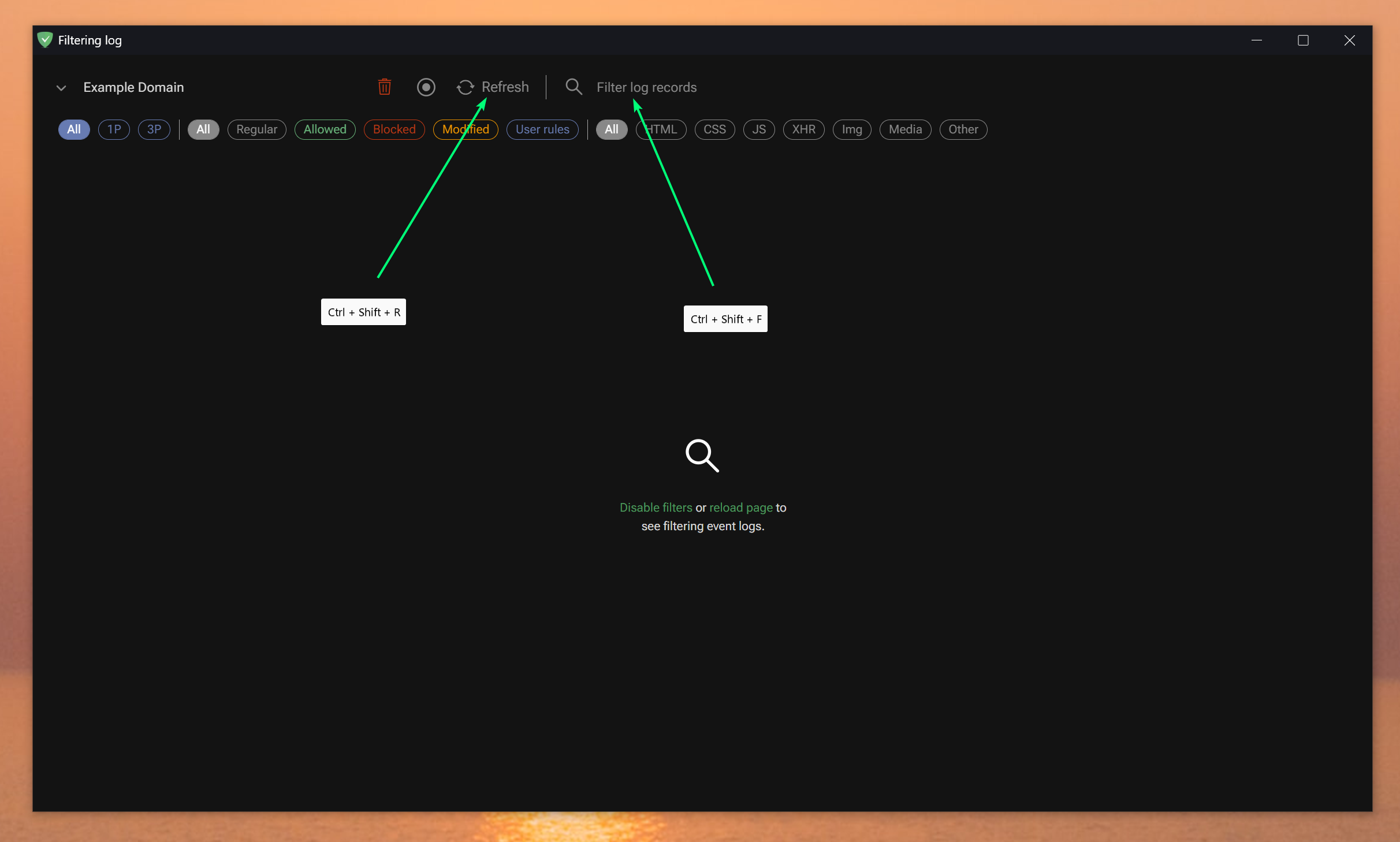 :bulb: Just use a tooltip on the respective icons to inform the user about these keyboard shortcuts.
Native:
Ctrl + F → search within the "filtering log page"
Ctrl + R → reload the "filtering log page"
AdGuard specific stuff:
Ctrl + Shift + F → search within requests
Ctrl + Shift + R → reload the associated tab (i.e. example.org here) :new:
(Ctrl or … Cmd on macOS.)
:1st_place_medal: About this flexibility …
Also, Chrome (and Edge, as detailed here — in the stable channel now) seems to have chosen to use Ctrl + Shift + [key] when it comes to special tab management. For example, search for a tab within your list of tabs with Ctrl + Shift + A.
Because Filtering log is a tabless popup window, those specific native hotkeys have no effect there. And that's perfect in our situation! Thus, AdGuard can for example search its own tab list similarly using Ctrl + Shift + A too (compare this AdGuard screenshot and this Edge screenshot).
After testing under Edge and Firefox, the interception works well. 🙂 Note just that under the latter, it hijacks access to "about:addons" though, but that's okay (because only in this popup). :thumbsup:
:gift: Possible bonus …
By the way, if implemented, in the continuity and if you agree, I'll create another issue (Feature Request) to have classic tab management replicated in Filtering log too:
Ctrl + Tab/Ctrl + Shift + Tab;Ctrl + [1-9].
:arrow_right_hook: AdGuard managing this in relation to its own list of tabs.
Another variant https://beautifier.io/ - on the first press opens the search in the edit box, on the secont - browser's search.