
ember-table
 ember-table copied to clipboard
 Addepar
Rendering Issue in Edge and IE when using occlusion
Hi, thanks for the great work!
We're trying to use ember-table in our Ember 3.3 app but unfortunately the rows don't rerender on scroll. The virtualisation works fine in all other browsers, just IE and Edge render only the initial items plus buffer size. Is this a known issue or could this be something on our end?
Edit: I was able to reproduce this in a plain Ember app. Not sure if it's related but Edge threw an error once (not reproducible) saying Symbol.iterator is not a function.

That's interesting, it points to Edge not having the Symbol API. Can you link to the reproduction?

I'm having the same problem, though I notice that the table works normally with the newer Edge 44.17763.1.0/EdgeHTML 18.17763 but fails with version Edge 42.17134.1.0/EdgeHTML 17.17134
Edit: We can mostly get by without occlusion, so for IE and Edge<18, we are currently turning off occlusion with renderAll=true. Not ideal, but our app still works ok

Any update on this? We have a good number of users using Edge 42.17134.1.0 that cannot be updated at the current point in time. We cant afford to turn off occlusion because there are tens of thousands of rows in the table.

I haven't retested this on my end, but when I was chasing down another bug I found that overflow:auto was on the wrong div in my layout, so instead of the div that ember-table was listening on, scrolling was happening elsewhere. I also saw that IE (not sure about Edge) handles default overflow values differently than other browsers. It might be worth looking in dev tools to make sure the class='.ember-table' div is the one with the scroll bar.
It is on the class=.ember-table div. I was testing that as well, but unfortunately it does not have any effect. Thank you for the suggestion!
@miketervela @Fl0rianFischer I was able to fix this issue by making sure that ember-cli-babel handles the polyfills for us. Just add this to your ember-cli-build.js file:
'ember-cli-babel': {
  includePolyfill: true
},

We are also having this issue, and with about 350 rows in the table at 17 columns each, renderAll=true isn't an option for us either. Even with occlusion, initial render is taking 5 seconds on both IE11 and Edge, as compared with 1.5 sec on Chrome and Firefox. With renderAll, it takes a very long time and threatens to time out, so unless we find a way around this, the component isn't usable on IE and Edge. We're also getting the Edge position:sticky issues on Windows 1709 but not 1807 or IE or Chrome or Firefox, so we're not having a great ride on Edge here.
I'm guessing whatever event scrolling is supposed to kick off isn't reaching the occlusion code for some reason. What's the best approach to debug this? Since we need it fixed, I'm willing to give it a little time if I know where to start.

I'm taking another try at this one with the latest ember-table. The good news is that the only issue I'm having on Edge is really slow animation frames (1.2s apiece on scrolling). On IE11, the result is far worse:
Occlusion fails inside VerticalCollection -private module, with an assertion [sic] value must non-negative
I captured some data from DynamicRadar._measure at the point of failure:
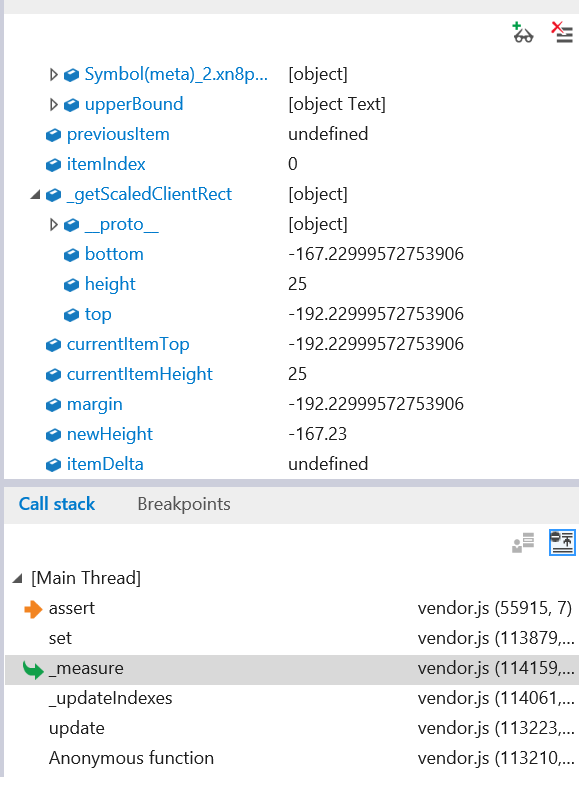
These are the methods involved:
SkipList.set < DynamicRadar._measure < DynamicRadar._updateIndexes of Radar.update
Hopefully since it all happens in the same module, a little arithmetic will point you to the lines involved. Since I don't really know what I'm looking at, I'm not in good position to debug, but hopefully the data collected will mean something to someone who does.
@lupestro what version of Ember are you using?
I wonder if this ticket, which is from 2018 and predates a large number of changes to the codebase, is not exact enough for us to focus on any particular issue.
Our use-cases at Addepar don't require support for IE11, but they do require support for Edge 44 and 42. Regardless if you wanted to investigate ways to improve IE11 support/performance I'm open to patches as a maintainer.
