
stable-diffusion-webui
 stable-diffusion-webui copied to clipboard
 AUTOMATIC1111
Upscaling is broken
Is there an existing issue for this?
- [X] I have searched the existing issues and checked the recent builds/commits
What happened?
Trying to upscale from 512x512 to 3x or even from 512x1024 to 2x doesn't work any longer. I don't know what has happened, but I installed 22bcc7be428c94e9408f589966c2040187245d81 a few days ago and since then it just doesn't work. It did before!
Steps to reproduce the problem
- txt2img
- Generate any image 512x512 and use Hires. fix with 3x (Any sampling method)
- Error and no upscaled output
What should have happened?
An upscaled version should have been created
Commit where the problem happens
22bcc7be428c94e9408f589966c2040187245d81
What platforms do you use to access the UI ?
Windows, Android
What browsers do you use to access the UI ?
Brave
Command Line Arguments
--no-half --listen --xformers --deepdanbooru --clip-models-path models/CLIP --ckpt-dir=Q:\_Checkpoints --api
List of extensions
| multidiffusion-upscaler-for-automatic1111 | https://github.com/pkuliyi2015/multidiffusion-upscaler-for-automatic1111.git | 70ca3c77 (Wed Apr 5 10:57:07 2023) | unknown |
|---|---|---|---|
| openpose-editor | https://github.com/fkunn1326/openpose-editor.git | a63fefc3 (Thu Mar 30 08:11:41 2023) | unknown |
| sd-webui-3d-open-pose-editor | https://github.com/nonnonstop/sd-webui-3d-open-pose-editor.git | 6004a31f (Sun Apr 9 05:42:42 2023) | unknown |
| sd-webui-additional-networks | https://github.com/kohya-ss/sd-webui-additional-networks.git | d944d428 (Thu Apr 6 10:42:19 2023) | unknown |
| sd-webui-controlnet | https://github.com/Mikubill/sd-webui-controlnet.git | e1885108 (Wed Apr 12 03:24:32 2023) | unknown |
| sd_save_intermediate_images | https://github.com/AlUlkesh/sd_save_intermediate_images.git | 8115a847 (Mon Mar 27 13:58:26 2023) | unknown |
| stable-diffusion-webui-composable-lora | https://github.com/opparco/stable-diffusion-webui-composable-lora.git | d4963e48 (Mon Feb 27 17:40:08 2023) | unknown |
| stable-diffusion-webui-images-browser | https://github.com/AlUlkesh/stable-diffusion-webui-images-browser.git | 57040c31 (Tue Apr 11 18:15:08 2023) | unknown |
| stable-diffusion-webui-two-shot | https://github.com/ashen-sensored/stable-diffusion-webui-two-shot.git | 6b55dd52 (Sun Apr 2 11:24:25 2023) | unknown |
| LDSR | built-in | ||
| Lora | built-in | ||
| ScuNET | built-in | ||
| SwinIR | built-in | ||
| prompt-bracket-checker | built-in |
Console logs
Error completing request
Arguments: ('task(9s6uss6q8ymxp0k)', 'test', 'bad anatomy, bad proportions, blur, blurry, body out of frame, calligraphy, cloned face, deformed, disconnected limbs, disfigured, disgusting, duplicate, extra arms, extra feet, extra fingers, extra legs, extra limb, floating limbs, fused fingers, grainy, gross proportions, kitsch, logo, long body, long neck, low-res, malformed hands, malformed limbs, mangled, missing arms, missing legs, missing limb, mutated hands, mutated, mutation, mutilated, mutilated, out of focus, out of frame, oversaturated, poorly drawn face, poorly drawn feet, poorly drawn hands, poorly drawn, sign, surreal, text, too many fingers, twins, ugly, watermark, writing', [], 20, 0, False, False, 1, 1, 7, 2994432242.0, -1.0, 0, 0, 0, False, 1024, 512, True, 0.21, 2, 'Nearest', 0, 0, 0, [], 0, False, 'MultiDiffusion', False, 10, 1, 1, 64, False, True, 1024, 1024, 96, 96, 48, 1, 'None', 2, False, False, False, False, False, 0.4, 0.4, 0.2, 0.2, '', '', 'Background', 0.2, -1.0, False, 0.4, 0.4, 0.2, 0.2, '', '', 'Background', 0.2, -1.0, False, 0.4, 0.4, 0.2, 0.2, '', '', 'Background', 0.2, -1.0, False, 0.4, 0.4, 0.2, 0.2, '', '', 'Background', 0.2, -1.0, False, 0.4, 0.4, 0.2, 0.2, '', '', 'Background', 0.2, -1.0, False, 0.4, 0.4, 0.2, 0.2, '', '', 'Background', 0.2, -1.0, False, 0.4, 0.4, 0.2, 0.2, '', '', 'Background', 0.2, -1.0, False, 0.4, 0.4, 0.2, 0.2, '', '', 'Background', 0.2, -1.0, False, False, True, True, 0, 3072, 192, False, False, 'LoRA', 'None', 1, 1, 'LoRA', 'None', 1, 1, 'LoRA', 'None', 1, 1, 'LoRA', 'None', 1, 1, 'LoRA', 'None', 1, 1, None, 'Refresh models', <scripts.external_code.ControlNetUnit object at 0x00000237E7C2AE30>, <scripts.external_code.ControlNetUnit object at 0x00000237E7C2AE00>, False, False, 'Denoised', 5.0, 0.0, 0.0, 'Standard operation', 'mp4', 'h264', 2.0, 0.0, 0.0, False, 0.0, True, True, False, False, False, False, False, False, False, '1:1,1:2,1:2', '0:0,0:0,0:1', '0.2,0.8,0.8', 20, 0.2, 1, 1, 1, 1, 1, 1, 1, 1, 1, 1, 1, 1, False, False, 'positive', 'comma', 0, False, False, '', 1, '', 0, '', 0, '', True, False, False, False, 0, None, False, None, False, 50) {}
Traceback (most recent call last):
  File "Q:\A1111\modules\call_queue.py", line 56, in f
    res = list(func(*args, **kwargs))
  File "Q:\A1111\modules\call_queue.py", line 37, in f
    res = func(*args, **kwargs)
  File "Q:\A1111\modules\txt2img.py", line 56, in txt2img
    processed = process_images(p)
  File "Q:\A1111\modules\processing.py", line 503, in process_images
    res = process_images_inner(p)
  File "Q:\A1111\modules\processing.py", line 653, in process_images_inner
    samples_ddim = p.sample(conditioning=c, unconditional_conditioning=uc, seeds=seeds, subseeds=subseeds, subseed_strength=p.subseed_strength, prompts=prompts)
  File "Q:\A1111\modules\processing.py", line 941, in sample
    samples = self.sampler.sample_img2img(self, samples, noise, conditioning, unconditional_conditioning, steps=self.hr_second_pass_steps or self.steps, image_conditioning=image_conditioning)
  File "Q:\A1111\modules\sd_samplers_kdiffusion.py", line 331, in sample_img2img
    samples = self.launch_sampling(t_enc + 1, lambda: self.func(self.model_wrap_cfg, xi, extra_args=extra_args, disable=False, callback=self.callback_state, **extra_params_kwargs))
  File "Q:\A1111\modules\sd_samplers_kdiffusion.py", line 234, in launch_sampling
    return func()
  File "Q:\A1111\modules\sd_samplers_kdiffusion.py", line 331, in <lambda>
    samples = self.launch_sampling(t_enc + 1, lambda: self.func(self.model_wrap_cfg, xi, extra_args=extra_args, disable=False, callback=self.callback_state, **extra_params_kwargs))
  File "Q:\A1111\venv\lib\site-packages\torch\utils\_contextlib.py", line 115, in decorate_context
    return func(*args, **kwargs)
  File "Q:\A1111\repositories\k-diffusion\k_diffusion\sampling.py", line 145, in sample_euler_ancestral
    denoised = model(x, sigmas[i] * s_in, **extra_args)
  File "Q:\A1111\venv\lib\site-packages\torch\nn\modules\module.py", line 1501, in _call_impl
    return forward_call(*args, **kwargs)
  File "Q:\A1111\modules\sd_samplers_kdiffusion.py", line 152, in forward
    devices.test_for_nans(x_out, "unet")
  File "Q:\A1111\modules\devices.py", line 152, in test_for_nans
    raise NansException(message)
modules.devices.NansException: A tensor with all NaNs was produced in Unet. Use --disable-nan-check commandline argument to disable this check.
Additional information
I'm on a 3090 with 24GB VRAM and have never before had any problem upscaling. I could at least easily do a 768x1024 x2 before I don't think it's the upscale specifically that is broken though. I just tried generating an image of resolution 1448x1456 and that generated the same error! I have just tried with --disable-nan-check and then I don't get the error, the upscaling runs through, but the result is a "black image"

I have needed to use --no-half-vae with certain models to avoid getting black images. I am running on an RTX4090

I have never run into black images before the update to this hash, so I don't know what has been changed to destroy the flexibillity. Before I could generate really large images if I wanted to or even upscale nicely. Now... Not so much :/ Now I need to use Topaz which is faster, but which doesn't have the LDSR that I love!
--no-half-vae didn't work for me at all. It makes the error turn up before generating a black image. Without --no-half-vae and --no-half I got the error directly without wasting time before getting the error... Still miss the error free upscaling :/
Have you recently upgraded to torch2? Im getting similar issue, turning off xformers seems to allow me to upscale again, but slower. I have tried dropping cuda and xformers versions down to 11.7 and 0.17 for xformers but no luck so far.
EDIT: @corydambach the intermittent black outputs you get are most likely due to broken vae. Try a different one and you should be able to run without --no-half-vae
Update 2: @Kallamamran I take it back dropping down to cuda 11.7 and xformers 0.17 has worked, but you also need to disable tiled vae/multidiffusion. At least on my setup: Nvidia 3070 non ti version 8gb vram.

I have updated to Torch 2 and cuda 11.8, but I was on Torch 2 and cuda 11.8 before this hash as well and back then it worked. Hmmm... Maybe downgrade torch again!? How ever that is done?
I have isolated the issue to xformers version 0.18. Sadly I'm unable to provide explanation on why exactly this happens. 0.17 works correctly, even with the latest 11.8 cuda version, so you don't need to downgrade that.
That sounds great. Then I just need to find out how to downgrade xformers :) Thanks for posting!!
cmd to venv/scripts -folder run activate to activate the venv pip uninstall xformers pip install xformers==0.0.17
Done!
Now scaling to 3x LDSR (1536x3048) works. It's not fast, but it works! 😊 Again... Thanks for posting! I wish I know why upscaling is so slow. It should be one of the easier things to do for an AI I imagine, but apparently not 🤔
PS. According to info apparently Torch 1.13 + xformers 0.0.18 works and Torch 2 + xformers 0.0.17 (Which I'm running now) works
Now scaling to 3x LDSR (1536x3048) works. It's not fast, but it works! 😊 Again... Thanks for posting! I wish I know why upscaling is so slow. It should be one of the easier things to do for an AI I imagine, but apparently not 🤔
I don't think it's upscaling in general that's slow, rather it's just the LDSR upscaler specifically that's slow.

Downgrade break a lot for me so I decide to upgrade instead and confirm working via 4090.
python: 3.10.11 • torch: 2.0.0+cu118 • xformers: 0.0.19 • gradio: 3.23.0 • commit: [22bcc7be]
cmd to venv/scripts -folder run activate to activate the venv
python.exe -m pip install --upgrade pip
pip install https://download.pytorch.org/whl/cu118/torch-2.0.0%2Bcu118-cp310-cp310-win_amd64.whl https://download.pytorch.org/whl/cu118/torchvision-0.15.0%2Bcu118-cp310-cp310-win_amd64.whl
pip install -U xformers
python -m xformers.info

Can confirm, upgrading to 0.0.19 actually fixed it for me! Before I couldn't upscale more than x2.3 (even x2.35 caused NaNs), now I easily did 3x with no issues. If you use Anaconda (and you really should!), it's even easier as it resolves the dependencies for you so you can use xformers 0.0.19 even with torch 1.13.1 which is tricky with pip.
One-line install would be conda install xformers=0.0.19 pytorch=1.13.1 torchvision torchaudio pytorch-cuda=11.7 pytorch-lightning torchmetrics -c pytorch -c nvidia -c xformers
If you only need xformers then use conda install xformers=0.0.19 -c xformers
One of the reasons I don't use Torch 2 is CUDA memory alignment errors in dmesg (NVRM: Xid (PCI:0000:01:00): 13, pid='<unknown>', name=<unknown>, Graphics SM Warp Exception on (GPC 0, TPC 1, SM 1): Misaligned Address) after which the program stops generating images, shows "In queue..." forever until I restart it. Can't 100% confirm it's because of Torch 2 but it didn't happen before I upgraded and stopped happening after I switched back to 1.13.1 so it's probably true.

Downgrading to 117 fixed it for me, but maybe upgrading to 119 works as well. I just don't know why 118 doesn't work
They're known for breaking things in a major way in their "stable" releases. Last time it was training being completely broken on 0.0.16 and few 0.0.17dev versions. I guess those two zeroes in the version number might be the reason why.
Downgrading to 117 fixed it for me, but maybe upgrading to 119 works as well. I just don't know why 118 doesn't work
0.0.19 xformers are working like a charm: https://github.com/facebookresearch/xformers/releases/tag/v0.0.19
I am quite new so sorry for the dumb question.
I have the following upscalers added
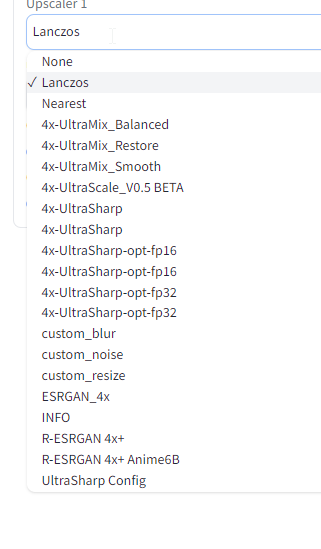
Only the first two work and the result is quite bad. The others I get always TypeError: argument of type 'NoneType' is not iterable
I tried what was advised here: https://github.com/AUTOMATIC1111/stable-diffusion-webui/issues/9619#issuecomment-1528762733
IT seems to have installed the upgrade but does not make a difference.
Would downloading the updated xformers folder from here make a difference, but where to add it?
Or should I do something else?

Seems like the original issue from OP was resolved here so I'm going ahead and closing this.
