
stable-diffusion-webui
 stable-diffusion-webui copied to clipboard
 AUTOMATIC1111
[Bug]: GPU OVERCLOCK even after the process in CMD ended.
Is there an existing issue for this?
- [X] I have searched the existing issues and checked the recent builds/commits
What happened?
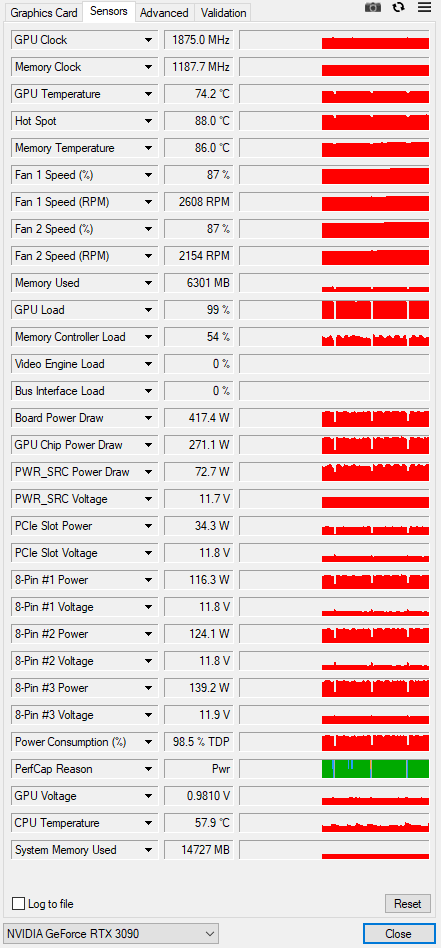
As you can see in the picture the GPU is still over 1.800MHz and the process has ended 10 minutes ago, the GPU need to be at maximul 200-300 MHz in rest mode. My GPU is an Aorus 3090 and in rest mode before to open SD is cold and at 200 MHz, even with CMD of SD open, the problem is after I give the program to work for the first time... After that the GPU is all the time OVERCLOCK.
Steps to reproduce the problem
- Go to SD
- OPEN IT
- Wait for the CMD to load the UI
- START A NEW TASK
- After the task is done to see the issue you need to install: TechPowerUp GPU-Z
- Check the Sensor Tab.
What should have happened?
In the rest zone to be the GPU Clock under 300 MHz
Commit where the problem happens
hmmm
What platforms do you use to access the UI ?
Windows
What browsers do you use to access the UI ?
Google Chrome
Command Line Arguments
no
List of extensions
no
Console logs
nothing, because the process is done already.
Additional information
No response

Существует ли существующая проблема для этого?
- [x] Я просмотрел существующие проблемы и проверил последние сборки / коммиты
Что произошло?
Как вы можете видеть на рисунке, частота графического процессора по-прежнему превышает 1.800МГц, а процесс завершился 10 минут назад, графический процессор должен работать на максимальной частоте 200-300 МГц в режиме покоя. Мой графический процессор - Aorus 3090, и в режиме ожидания перед открытием SD холодный и на частоте 200 МГц, даже при открытом CMD SD, проблема возникает после того, как я впервые запускаю программу... После этого графический процессор постоянно РАЗГОНЯЕТСЯ.
Шаги по воспроизведению проблемы
- Перейдите на SD
- ОТКРОЙТЕ ЕГО
- Подождите, пока CMD загрузит пользовательский интерфейс
- ЗАПУСТИТЕ НОВУЮ ЗАДАЧУ
- После выполнения задачи, чтобы увидеть проблему, которую вам необходимо установить: TechPowerUp GPU-Z
- Проверьте вкладку "Датчик".
Что должно было произойти?
В зоне отдыха должна быть частота графического процессора ниже 300 МГц
Зафиксируйте, где возникает проблема
хммм
Какие платформы вы используете для доступа к пользовательскому интерфейсу?
Windows
Какие браузеры вы используете для доступа к пользовательскому интерфейсу?
Google Chrome
Аргументы командной строки
НЕТСписок расширений
НЕТ
Журналы консоли
ничего, потому что процесс уже завершен.Дополнительная информация
Ответа нет
https://user-images.githubusercontent.com/31959570/221199885-d3a6e391-9f89-42a6-b287-cac7ad5ba23d.mp4
Apparently it is a floating error, or a miner that engages the video card. I've tried it on an RTX3090Ti Gigabyte

Do you know how I can fix it?
To fix it, you need to understand what causes it and at what point it happens. I have the latest version installed and no third-party extensions. But in the latest build, there are a number of bugs that have damaged some functionality. I also have the latest version of CUDA Toolkit 12.0 installed, perhaps it solves some of the problems on the GPU side.
@ElFenomenoTv First step is to check in Windows Task Manager (or good alternative like System Informer) to see which process is using the GPU.

I really don`t know, I update driver, I made everything...the problem is there...after few generating images he stuck and the fans never stop until I close the CMD.
Before to start again the CMD and play with the SD to generate images the GPU is perfect and work like a charm.
I don't think it's possible to know the cause of the problem, as it is. There are too many unknowns about your installation.
Even for basic troubleshooting, you'll have to spend some time and effort to solve it. I recommend installing a fresh copy of WebUI in a new directory (and no extensions), and testing with that to see if the same problem happens. If the issue does still happen with a clean install, then maybe you have problems with your system's Python installation.