
stable-diffusion-webui
 stable-diffusion-webui copied to clipboard
 AUTOMATIC1111
[Feature Request]: "Discard" Button Next to Skip Button
Is there an existing issue for this?
- [X] I have searched the existing issues and checked the recent builds/commits
What would your feature do ?
Add a "Discard" button (Split the Skip button into two vertical halves).
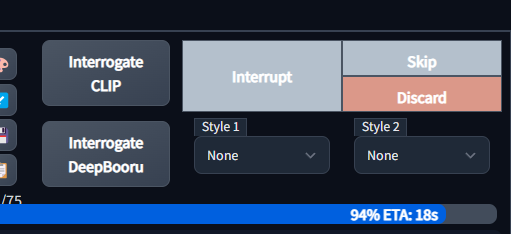
The Split button remains the same.
The Discard button performs the same action as Skip, and also deletes / prevents saving the file.
Even if the user has preview images disabled, it is still beneficial to have a Discard button if, for example, the user realized halfway through image generation that they had used an incorrect parameter and wanted to cancel/discard the job.
(Maybe) disable the Discard button if the user has a Batch Size > 1? Since it's not possible to preview every image in a single batch when the value is > 1, only the first image in the batch. It would not be desirable to discard a whole batch after only previewing the first image.
Proposed workflow
Sample workflow, where the user is editing configuration values on-the-fly and generating images infinitely in order to find the best result:
- Begin "Generate Forever" with Batch Size set to 1
- As an image starts to generate, with previews enabled, review the image
- If an undesired image appears, the user can press "Discard" to delete the image - the image is not saved to any outputs, not included in any grids, and the next batch
- The user can continue to make tweaks on the fly in order to refine prompts and parameters, and ultimately only keep the images that they deem acceptable based on the real-time preview
Additional information
No response

Hi @xrpgame (and @some9000 and @MatthewK78 who reacted), please test my implementation of this feature.
Although I had fun making it; my biggest concern is its use might not be worth the clutter it adds. Hence the @'s, so you can test it and, if it's all it chalked up to be, advocate for it strongly. I'm open to hearing any improvements as well.
P.S. I avoided adding "disable the Discard button if the user has a Batch Size > 1" for two reasons. First, I'm not entirely convinced it's useless -- the "user realized incorrect parameter" case still applies after all. Second, doing more work to remove potential functionality seems wrong for a first draft. I hope you understand.
Thank you and looking forward to hearing your thoughts.

Hmm, it did appear in the interface, but seems to do nothing. Generation continues on, and when clicked it does not skip like the Skip button does. Also, from the description I assumed it would function like this: Press it when a prompt is being processed, stop that, delete anything that has been created already, clear the preview. Press it when a prompt is finished, if anything was saved as files, completely delete those and clear the preview. Currently that does not happen. I just chucked it on top of the latest version.

@some9000 what OS / browser combo are you using? I can't think of anything else it could be, it works with all the combos I've tried: Windows with Firefox, Windows with Chrome, and iOS with Safari
EDIT2: Just tried Windows with Edge, and it works. Are you not getting this message in the bottom left?
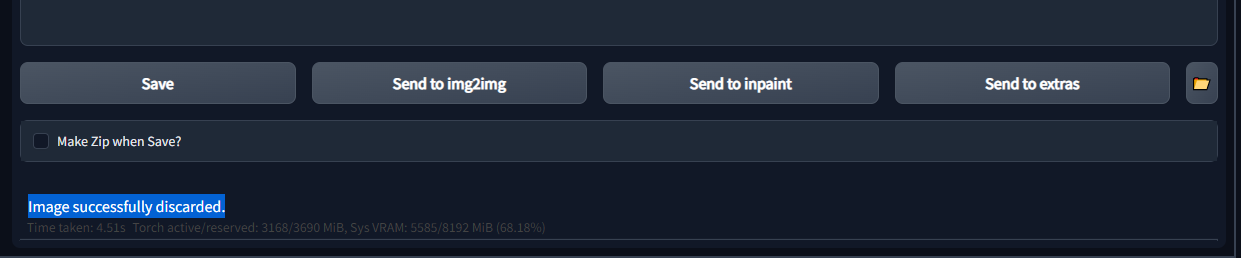
EDIT: As to this:
Press it when a prompt is finished, if anything was saved as files, completely delete those and clear the preview.
Consider that Skip/Discard are not visible whenever something is finished. It goes back to being one big Generate button.
Press it when a prompt is being processed, stop that, delete anything that has been created already, clear the preview.
This is a fine interpretation. Wondering whose is in line with what @xrpgame had in mind?
Vivaldi here, which is basically Chrome. I will clean up the Stable Diffusion and have a look what happens then. At the same time my experience with github is limited. So I just bluntly copy/pasted this over everything hoping that a new pull would reset everything to the "official" version. That did no happen, hence trying to reset everything.
Apparently this will take a while...
Consider that Skip/Discard are not visible whenever something is finished. It goes back to being one big Generate button.
I know, that is why it would be nice if that button could have like an X on the right or such.
@some9000 Ah, here, I gotcha. To reset, first do this:
git reset --hard
Then to check out the relevant branch, do this:
git checkout 04e90a2
I'm also new to git. Hope this works.
@timntorres Thank you for taking a stab at this!
First, to any other testers - in order to "test" this branch, since you're effectively pulling a branch from a different repo (which is also a pending PR), you need to run:
git fetch origin pull/3772/head:discard_button
git checkout discard_button
(You can replace discard_button with something else if you want. It's your local branch name.)
I will leave testing notes in the PR (#3772).
in current dev branch Setting > Saveing images/grids Save incomplete images (save images that has been interrupted in mid-generation; even if not saved, they will still show up in webui output.) is disabled by default
