
stable-diffusion-webui
 stable-diffusion-webui copied to clipboard
 AUTOMATIC1111
Blue artifacts in many images
Describe the bug I've noticed that there are many blue artefacts being generated in txt2img, this is mostly noticeable on simple white backgrounds, changing the steps, CFG and sampler has no effect in removing them, I found a suggestion to use the dev version of Pytorch so I installed 1.14.0.dev20221007+rocm5.2 but this seems to have had no effect on the problem.
To Reproduce Steps to reproduce the behavior:
- Generate an image with a white background
Expected behavior No blue blobs
Screenshots
 "a sheet of white paper, 4k, high definition"
Desktop (please complete the following information):
- OS: Arch Linux
- Browser: Firefox
- Commit revision: f7c787eb7c295c27439f4fbdf78c26b8389560be
Additional context I'm using an AMD RX 6650XT 8GB with HSA_OVERRIDE_GFX_VERSION=10.3.0 to get it working, I've not noticed it happening in some different docker based installations such as https://github.com/l1na-forever/stable-diffusion-rocm-docker so it may have some relationship to the system ROCm, I will try the docker installation later to see if it makes any difference.

I can confirm the docker version also has the exact same problem, I'm not really sure what to try next, any suggestions would be welcome.
I still don't know why they appear. Some disappear after more steps are generated but some are still noticeable in the final image too.

I've tried dozens of different prompts and have come to the conclusion that this issue can affect all images, although the more detailed it is and the more steps you use the less likely you are to notice it, the blue or black blobs are frequently visible even after a single step.
not only on images with white background... this is just a test example to test. notice the blue dot on the rock and sky horizon.
landscape Steps: 20, Sampler: Euler a, CFG scale: 7, Seed: 1793192053, Size: 512x512, Model hash: 7460a6fa
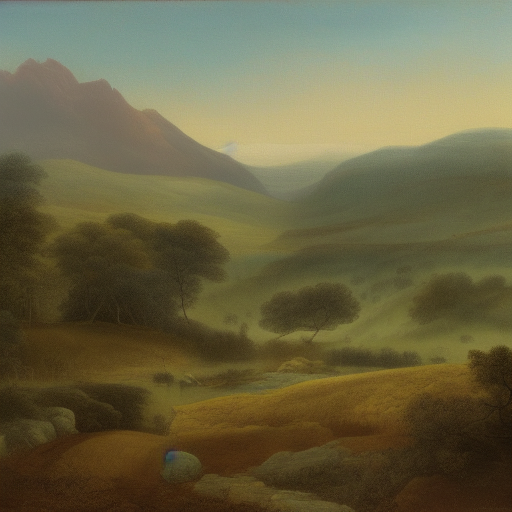
@hd-x are you using an AMD card ? I'm wondering if this is AMD only or affects all cards and possibly CPU.
no. I'm using NVIDIA I wonder why not many people are talking about this and makes me wonder if we have something wrong in our installation.
I'm also getting this using a 1070. Seems to occur in every sampler I've tried. Also I've had two installs of this repo and it happened on both. Good to know it's not just me - I have to wonder if the majority of users just don't notice it.

I'm also getting this using a 1070. Seems to occur in every sampler I've tried. Also I've had two installs of this repo and it happened on both. Good to know it's not just me - I have to wonder if the majority of users just don't notice it.
I've tried many online generators and every one seems to exhibit this issue, so yeah it looks like most people are simply not noticing it, since I've been able to reliably replicate this problem I've opened an issue on the official github: https://github.com/CompVis/stable-diffusion/issues/384
why I don't see the blue artifacts in images out there that people upload everywhere? we must have something wrong. I am going to try and reinstall everything from scratch.
@hd-x It doesn't appear to be a hardware or installation issue, if you try online generators all of them have this problem, I think most people are just not noticing it.
Two of the biggest factors I have found are prompt complexity and depth, more complex prompts with tokens that add detail to the image seem to drastically reduce the appearance of the artefact, limited depth also is a major cause of it, with it appearing very consistently on flat textures such as paper, concrete, metal, etc.
As such the best thing to do is to avoid simple prompts, 'landscape' will almost certainly show the artefact whereas something like "a painting of a hilly landscape with sheep grazing in the foreground and a mountain range in the background, by Laurent Grasso" will very rarely show it.
For textures there isn't a lot you can do if you're after smooth textures, more detailed textures like brick, cobblestone, tiles are somewhat better but you're still going to get around a 40% failure rate, so I wouldn't recommend stable diffusion for texture generation until this is fixed.
I have the same problem on my 3060.
What I'm doing is send these to inpaint and go over them multiple times if needed. Unfortunately it often messes up the image...

mmm. I just find the blue artifact, in some images. sometimes to the left, sometime to the right, always on the top half. nothing Photoshop can't deal with.

any solution? All these blue artifacts still exist even in latest version

I've generated the image with prompt from @hd-x and can't see any blue artifacts on it. It's something local, therefore until we realise the source of the artifacts, we cannot fix it.
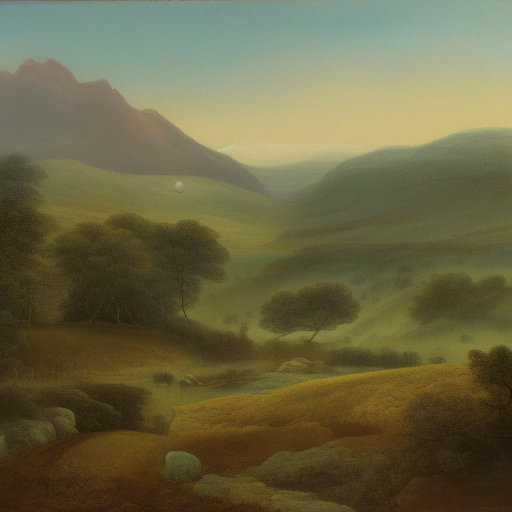

I've generated the image with prompt from @hd-x and can't see any blue artifacts on it. It's something local, therefore until we realise the source of the artifacts, we cannot fix it.
I presume you're using the updated VAE ? this will fix most previously reported cases, try generate 'white paper texture' Sampler: Euler a, CFG scale: 7, Seed: 4284223395, Size: 512x512, Model hash: cc6cb27103 (v1.5-emaonly), or just generate random seeds with the same prompt and you should see it within 10 images.
This artifacts exist when use tiling. In preview early steps its show as white zones. In final image its blue color.

