
AAChartKit-Swift
 AAChartKit-Swift copied to clipboard
Published
20 hours ago •
 AAChartModel
AAChartModel
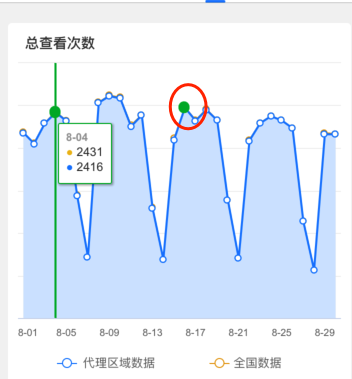
当前选中的点在焦点改变时,偶尔不消失。

  func returnChartModelCha(_ maxInt:Double)-> AAOptions
    {
        aaChartModel = AAChartModel()
            .chartType(.area)
           .tooltipEnabled(true)
            .dataLabelsEnabled(false)
            .tooltipValueSuffix("℃")
            .animationType(.bounce)
            .markerSymbol(.circle)
            .markerSymbolStyle(.innerBlank)
            .markerRadius(3)
            .yAxisLabelsEnabled(false)
            .colorsTheme(["#E39B15","#1678FD"])//Colors theme
            .yAxisMax(maxInt)
            .categories(dateArr)
            .xAxisLabelsStyle(AAStyle(color: "#666666", fontSize: 10, weight: .regular))
            .legendEnabled(false)
            .animationType(.easeOutCubic)
//                .tooltipValueSuffix("$")
            .animationDuration(1200)
            .series([
                AASeriesElement()
                    .states(AAStates()
                        .hover(AAHover()

                            .halo(AAHalo()
                                .size(0))))
                    .marker(AAMarker()
                        .states(AAMarkerStates()
                                .hover(AAMarkerHover()
                                    .fillColor("#00B029")
                                    .radius(5)
                                    .lineColor("#00B029")//设置 AAMarkerHover 外部边缘线颜色
                                    .lineWidth(1))

                       ))  //设置 AAMarkerHover 外部边缘线宽度
                    .data(allView)
                    .name("1")
                    .fillOpacity(1)
                    .fillColor("#F9EBD0")
                    .lineWidth(1)

                    ,
                AASeriesElement()
                    .name("2")
                    .states(AAStates()
                        .hover(AAHover()

                            .halo(AAHalo()
                                .size(0))))
                    .marker(AAMarker()
                        .states(AAMarkerStates()
                            .hover(AAMarkerHover()
                                    .fillColor("#00B029")
                                    .radius(5)
                                    .lineColor("#00B029")//设置 AAMarkerHover 外部边缘线颜色
                                    .lineWidth(1))
                        ))//设置 AAMarkerHover 外部边缘线宽度
                    .data(allScope)
                    .fillOpacity(1)
                    .fillColor("#D0E4FF")
                    .lineWidth(1)


                    ,
                ])

        let options = returnOptinos(aaChartModel)

        return options
    }
 func returnOptinos(_ model:AAChartModel) -> AAOptions
    {
        let wids = UIScreen.main.bounds.size.width-32
        let opat = String.init(format: """
            function (labelWidth, labelHeight, point) {
                        let xPosition = point.plotX;
                        let maxXPosition = \(wids) - 100;
                        if (xPosition >= maxXPosition) {
                            xPosition = maxXPosition
                        }else if (xPosition <= 50)
                        {
                            xPosition = 50
                        }else
                        {
                            xPosition = xPosition + 20
                        }
                        let position = {};
                        position["x"] = xPosition;
                        position["y"] = 70;
                        return position;
                    }
            """)


//        function (labelWidth, labelHeight, point) {
//                    let xPosition = point.plotX;
//                    let maxXPosition = \(wids) - 100;
//                    if (xPosition >= maxXPosition) {
//                        xPosition = maxXPosition
//                    }else if (xPosition <= 50)
//                    {
//                        xPosition = 50
//                    }else
//                    {
//                        xPosition = xPosition + 20
//                    }
//                    let position = {};
//                    position["x"] = xPosition;
//                    position["y"] = 70;
//                    return position;
//                }
        let aaOptions = model.aa_toAAOptions()
        aaOptions.xAxis?.tickInterval(dateArr.count > 10 ? 4 : 0)

        aaOptions.tooltip?
                   .style(AAStyle(color: AAColor.white))
                   .backgroundColor("#050505")
                   .borderColor("#050505")

        aaOptions.tooltip(AATooltip()
            .shared(true)
            .valueDecimals(2)//设置取值精确到小数点后几位//设置取值精确到小数点后几位
            .backgroundColor("#FFFFFF")
            .borderColor("#00B029")
            .followTouchMove(true)
            .style(
                AAStyle()
                    .color("#333333")
                    .fontSize(12)
                    .fontWeight(AAChartFontWeightType.thin)
                    )
            .useHTML(true)
            .formatter(#"""
                    function ()
                    {
                        return this.points.reduce(function (s, point) {
                            if (point.series.name == '1')
                            {
                              return s + '<br>' + '<span style=\" color:#ECB917 \">●</span> ' + point.y ;
                            }else if (point.series.name == '2')
                            {
                              return s + '<br>' + '<span style=\" color:#1678FD \">●</span> ' + point.y ;
                            }


                        }, '<b>' + '<span style=\" color:#999999; font-size:11px; font-weight:regular  \">' + this.x + '</span> '  + '</b>');
                    }
                """#)
                .positioner(opat)
        )

        //默认选中的位置索引

        let b = Double(dateArr.count/2)
        let defaultSelectedIndex = Int(ceil(b))

        aaOptions.chart?.events(
                    AAChartEvents()
                        .load("""
                function() {
                    let points = [],
                        chart = this,
                        series = chart.series,
                        length = series.length;

                    for (let i = 0; i < length; i++) {
                      let pointElement = series[i].data[\(defaultSelectedIndex)];
                      points.push(pointElement);
                    }
                    chart.xAxis[0].drawCrosshair(null, points[0]);
                    chart.tooltip.refresh(points);
                  }
        """))

        aaOptions.xAxis?
                   .crosshair(
                       AACrosshair()
                           .color("#00B029")
                           .dashStyle(.solid)
                           .width(2)
                           .zIndex(5)
                   )

        return aaOptions
    }
请问问题解决了吗?我也遇到了这个问题,如果默认选中了一个位置之后,然后选择其他的,默认选中的那个颜色还是默认状态,只有点击之后再选择其他的默认状态才会改变

