

 4paradigm
快速上手 步骤 2:导入离线数据 报错Fail to get TaskManager client
Bug Description
docker版本:Docker version 19.03.13, build 4484c46d9d
按照如下教程操作
https://openmldb.ai/docs/zh/main/quickstart/openmldb_quickstart.html
步骤2执行命令LOAD DATA INFILE 'file:///work/taxi-trip/data/data.parquet' INTO TABLE demo_table1 options(format='parquet', mode='append');
会报错
W1019 09:05:28.492478 3248 db_sdk.cc:291] fail to get zk value with path /openmldb/taskmanager/leader E1019 09:05:28.492506 3248 db_sdk.cc:66] fail to get TaskManager address W1019 09:05:28.492537 3248 sql_cluster_router.cc:2749] Status: [2001] taskmanager load data failed--ReturnCode[1003]--Fail to get TaskManager client Error: [2001] taskmanager load data failed--ReturnCode[1003]--Fail to get TaskManager client
是使用方式不对么?求解

@ICESDHR taskmanager not setup correctly.
What's the result of first step /work/init.sh ?

@ICESDHR Try:
SHOW COMPONENTSin CLI see if taskmanager available- If that not work, try the python tool: https://openmldb.ai/docs/zh/main/maintain/diagnose.html#inspect
@aceforeverd taskmanager not work, and inspect offline fail, Is init.sh a problem?
@aceforeverd Can you execute this Quickstart content(https://openmldb.ai/docs/zh/v0.8/quickstart/openmldb_quickstart.html#) correctly on a linux machine?
@ICESDHR Looks like I can startup taskmanager in my docker
And taskmanager logs should locate in /work/openmldb/taskmanager/bin/logs, checkout ?
resolved endpoint looks weired: localhost/0:0:0:0:0:0:0:1:2181
@vagetablechicken do you have any experience about that ?
localhost -> ipv6, but it seems like not the root cause. The taskmanager conf server.host= won't be used when server starts, so it always calls java.base/java.net.InetAddress.getLocalHost. And it failed, then 2023-10-19 11:44:26,679 ERROR [com.baidu.brpc.utils.NetUtils] - Failed to get local host ip address, use 127.0.0.1 instead.
It's wierd that use 127.0.0.1 failed, I'll check the source code.

localhost -> ipv6. The taskmanager conf
set server.host=won't be used when server starts, so it alwaysjava.base/java.net.InetAddress.getLocalHost. And it failed, then2023-10-19 11:44:26,679 ERROR [com.baidu.brpc.utils.NetUtils] - Failed to get local host ip address, use 127.0.0.1 instead.It's wierd that use 127.0.0.1 failed, I'll check the source code.
Failed to get local host ip address, use 127.0.0.1 instead. is a fake log, : ) So got nullpoint below.
And we miss the exception by wrong log print in taskmanagerserver, it's not good for debug, needs fix.
@vagetablechicken I deployed the service using deployment, use hostAliases, it works
spec:
  hostAliases:
  - ip: "127.0.0.1"
    hostnames:
      - "integrator"
@vagetablechicken I deployed the service using deployment, use hostAliases, it works
spec:
  hostAliases:
  - ip: "127.0.0.1"
    hostnames:
      - "integrator"
So you use k8s to start cluster? You should say it first. It won't fail if you just docker run it. hostAliases is the same with /etc/hosts edit.
Anyway, is it hard to start a pod with our openmldb image? How about give us some advise? A pod config yaml?
@vagetablechicken no, i use docker to start cluster first, and fail; then I deployed with k8s because I was more familiar with it;
/etc/hosts in docker container, failure logs have been sent before
/etc/hosts in k8s pod with hostAliases
docker image will have problems in taskmanager in my environment, but not in @aceforeverd 's environment. Is docker image need to add some fault tolerance measures? Since I'm already running successfully in k8s (and will eventually be deployed in k8s), I won't be trying to fix docker booting; Here is a simple deploy I used to experience some of the features of openmldb(use kubectl exec -ti
apiVersion: apps/v1
kind: Deployment
metadata:
  name: openmldb
  namespace: openmldb
spec:
  selector:
    matchLabels:
      name: openmldb
  template:
    metadata:
      labels:
        name: openmldb
    spec:
      hostAliases:
      - ip: "127.0.0.1"
        hostnames:
          - "integrator"
      containers:
      - image: 4pdosc/openmldb:0.8.3
        name: openmldb
        command: ["/bin/sh"]
        args: ["-c", "/work/init.sh;sleep 1d"]
        ports:
        - containerPort: 9080
@ICESDHR Thanks for your uploading. So you just run docker run -it 4pdosc/openmldb:0.8.3 bash and the error is Caused by: java.net.UnknownHostException: 04a841e90834: Temporary failure in name resolution, and /etc/hosts contains 127.0.0.1 localhost? That's wierd.
Does /etc/hosts in docker container contains 172.17.x.x <hostname-number> ? Is it the whole file in the pic you uploaded?
@ICESDHR if you want to get quick reply from us, you may also join our wechat group :-)

@vagetablechicken not contains 172.17.x.x
@vagetablechicken not contains 172.17.x.x , the whole file in docker container as follow:
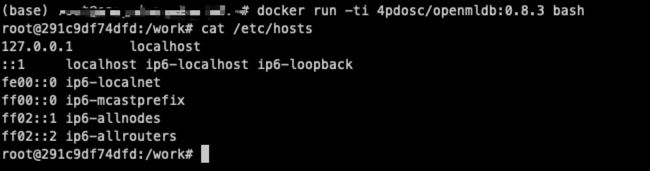
I think it's root cause and it's different from normal cases. In my env, docker starts container in bridge, docker network ls can check. And /etc/hosts will have <internal-ip> <container-name>.
Could you docker info and cat /etc/resolv.conf to show more info?
BTW, it may work if you start container in other network, e.g. docker run --network host ...